Orion already knows your devices and which ports connect them. Run a read-only export script, choose the file it saves, and NetworkSketch draws the switches, firewalls, routers and the cabling between them, with port labels and link speeds, arranged automatically and ready to edit.
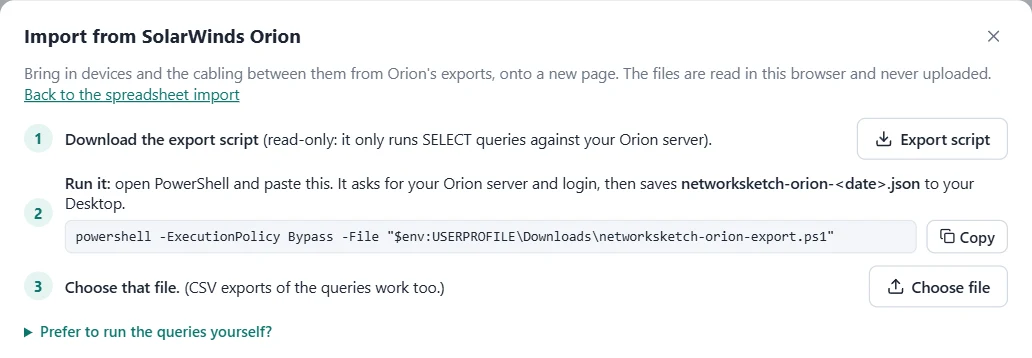
In the editor, click Import, then Import from SolarWinds Orion. The dialog walks you through it:
Click Export script. It saves networksketch-orion-export.ps1 to your Downloads folder. It's plain text, so you can open it in Notepad and read every query before you run it.
Click Copy, open PowerShell (Start menu, type PowerShell), paste and press Enter. Enter your Orion server name, username and password when asked. It saves networksketch-orion-<date>.json to your Desktop and opens the folder.
Back in the dialog, click Choose file and pick the .json file. It's read right there in your browser and never uploaded.
The command, if you want it handy:
powershell -ExecutionPolicy Bypass -File "$env:USERPROFILE\Downloads\networksketch-orion-export.ps1"
-ExecutionPolicy Bypass applies to this one run only; it doesn't change any settings on your PC.
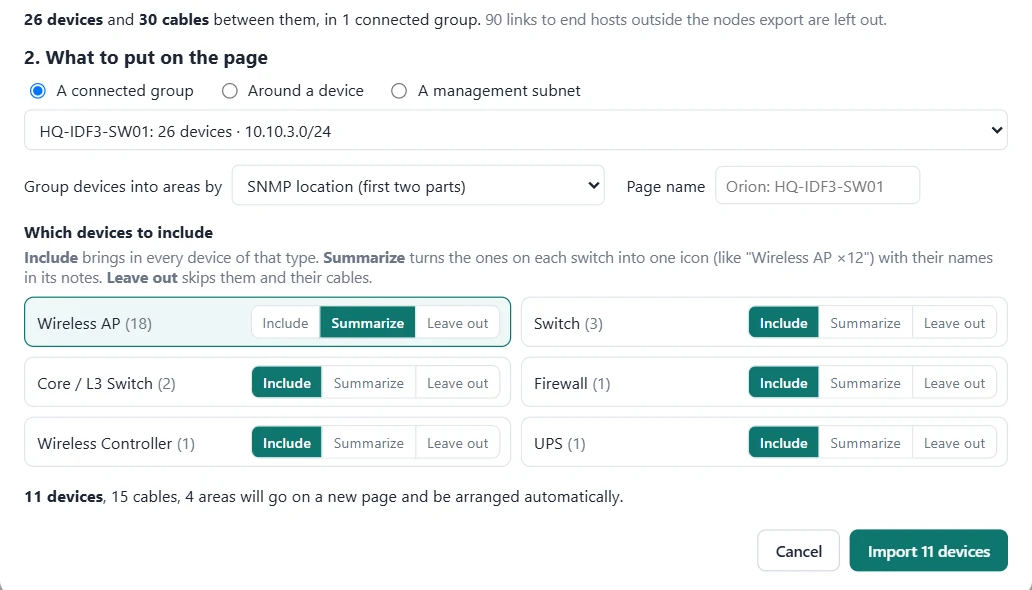
A whole Orion install is far too much for one readable diagram, so you pick a piece of it:
A connected group (everything cabled together), the devices around one device within a few hops, or everything in a management subnet.
Group devices into areas by their SNMP location, their /24 subnet or a hostname prefix (like HQ-IDF1), so each closet or site gets its own box.
Per device type. Summarize turns the access points on each switch into one icon like "Wireless AP ×6", with every hostname kept in its notes.
Anything Orion lists without a recognizable vendor or model is shown one by one, so you can give each a type or leave it out.
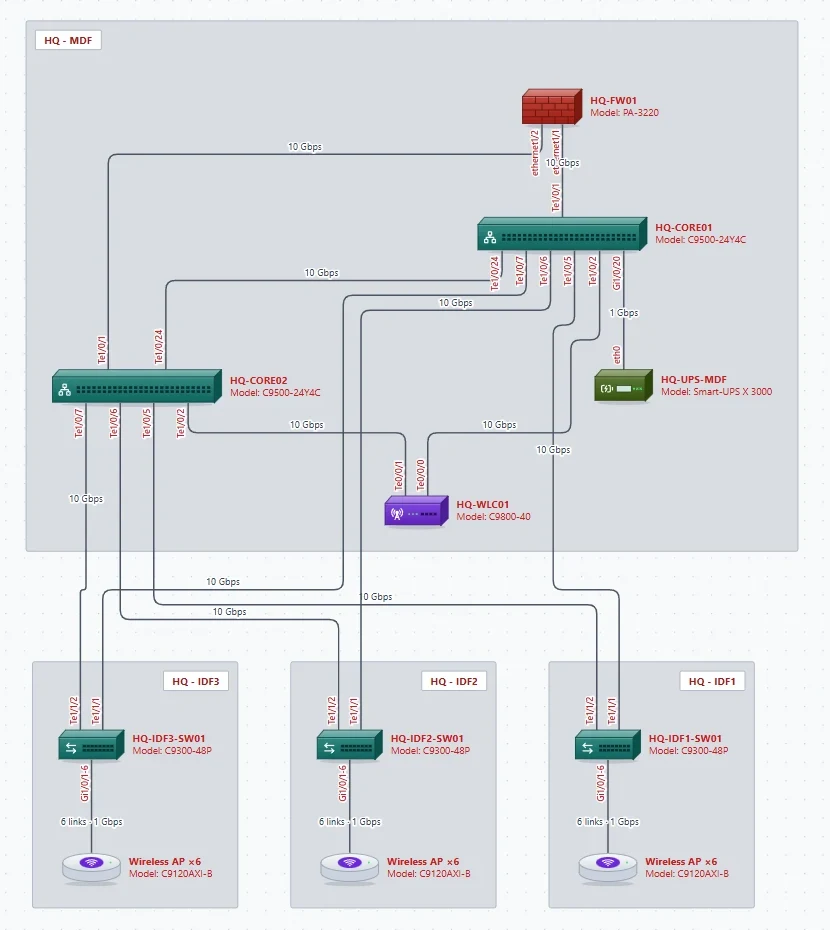
Click Import and the devices land on a new page, arranged top-down and grouped into their areas. From there it's a normal NetworkSketch diagram: move things, add what Orion doesn't monitor, and export a PDF with an inventory and cabling schedule.
Hostname, management IP, vendor, model, OS version and SNMP location, with the right icon for switches, L3 switches, routers, firewalls, SD-WAN edges, wireless APs and controllers, load balancers, servers, UPSs and PDUs.
Each link between two monitored devices, with the port at each end (shortened, like Te1/0/1) and its speed. Parallel links and port-channel members are merged into one cable with a port range.
Links to end hosts that aren't Orion nodes (PCs, phones, printers on access ports) are skipped, so the diagram shows the network, not every desk.
If you downloaded the script more than once, your browser may have saved it as networksketch-orion-export (1).ps1. Delete the older copies in Downloads and download it again, or change the file name in the command to match.
Check the server name (the same one you use for the Orion web console, without https://), the username and password, and that your PC can reach the server on TCP port 17778. A firewall between you and Orion is the usual cause.
The first run downloads SolarWinds' module from the PowerShell Gallery. Behind a proxy without internet access, install the Orion SDK from SolarWinds' GitHub page (OrionSDK) once, then run the script again.
Use the full command above, including -ExecutionPolicy Bypass. If your company blocks that with Group Policy, ask IT, or use the queries under Prefer to run the queries yourself? in the dialog and save each result as a CSV; the import reads those too.
The cables come from Orion's topology data. If Orion.TopologyConnections is empty, enable topology polling (CDP/LLDP) on your network nodes in Orion, wait for a polling cycle, and export again.
No. The script talks only to your Orion server and writes a file on your PC. NetworkSketch reads that file in your browser; it isn't uploaded to us. The diagram you make is saved wherever you save it.
No. The import works in the free editor with no account; saving and exporting the diagram needs the 7-day free trial or a plan. Pricing.
Open the editor, click Import, then Import from SolarWinds Orion.
Open the editor