Network diagram templates

Start from a real network, not a blank page.

Each template is a complete, editable diagram with real devices, cabling with media types and port labels, buildings and VLANs, and a media type key. Open one in your browser, rename the devices and make it yours.

Templates open in the real editor. No account needed to look around; the free 7-day trial (no credit card) adds saving and PDF export.
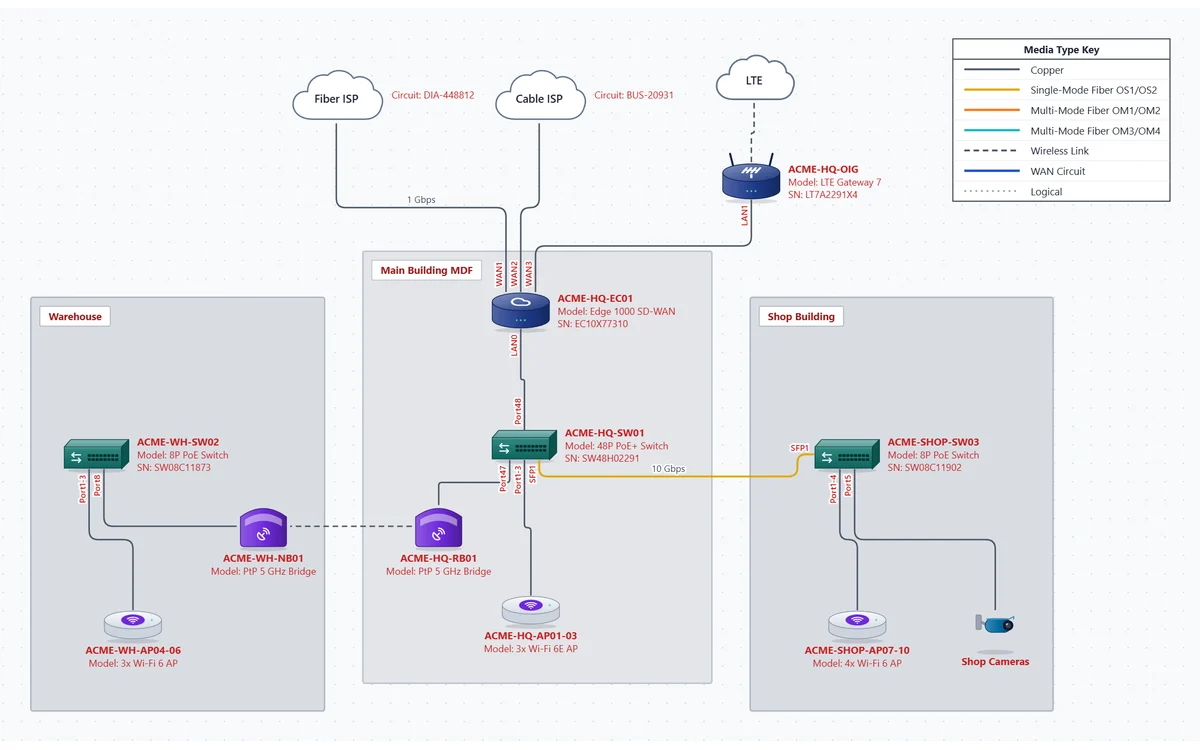
Campus / branch office template: dual ISPs and LTE into an SD-WAN edge, a main building MDF, a warehouse and a shop building joined by wireless bridges and fiber

Campus / Branch Office

A small campus with three buildings, the way most branch sites actually look.

  • Fiber and cable ISPs plus LTE backup into an SD-WAN edge
  • Main building MDF, warehouse and shop building as areas
  • Point-to-point wireless bridge and fiber between buildings
  • Switches, access points and cameras with port labels
  • A second page with the logical view: corporate, voice and guest VLANs
Open this template
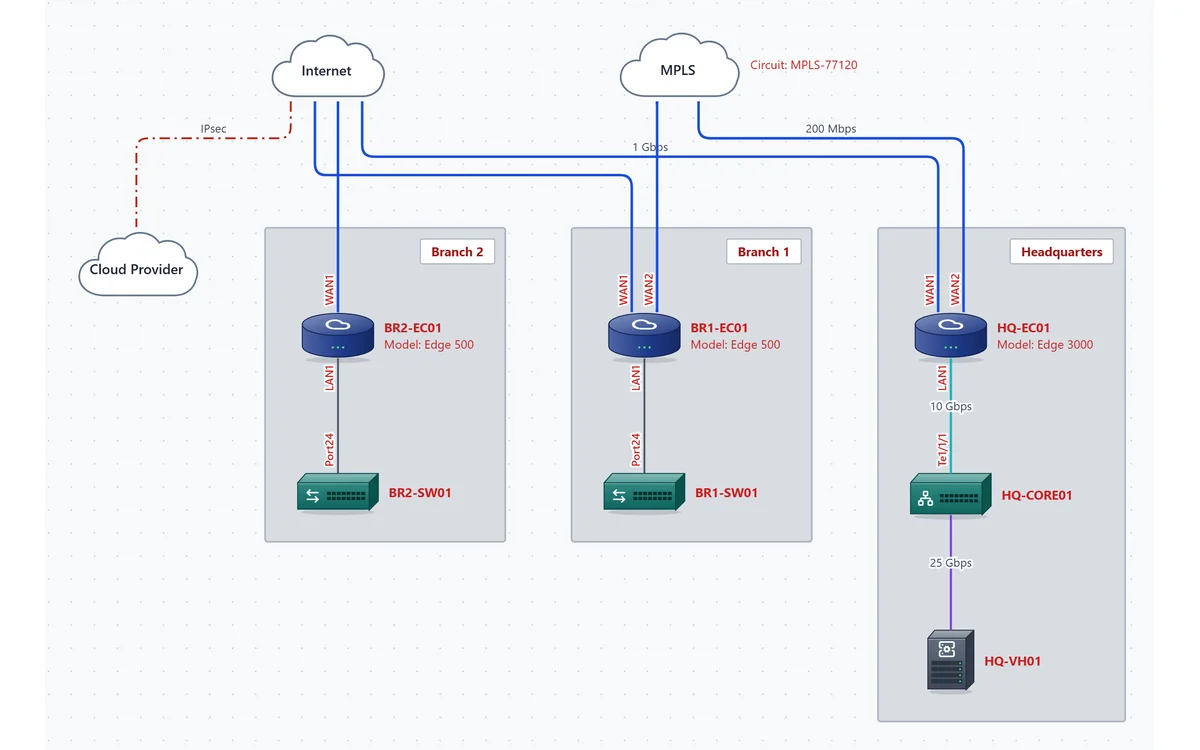
Multi-site SD-WAN template: headquarters and two branches connected over the Internet and MPLS, plus a cloud provider over VPN

Multi-site SD-WAN

Headquarters and two branches over Internet and MPLS, with a cloud provider reached by VPN.

  • SD-WAN edges at every site over the Internet, with MPLS at headquarters and Branch 1
  • HQ core switch and virtualization host
  • Branch switches inside each site area
  • WAN circuits and VPN tunnels in their own line styles
Open this template
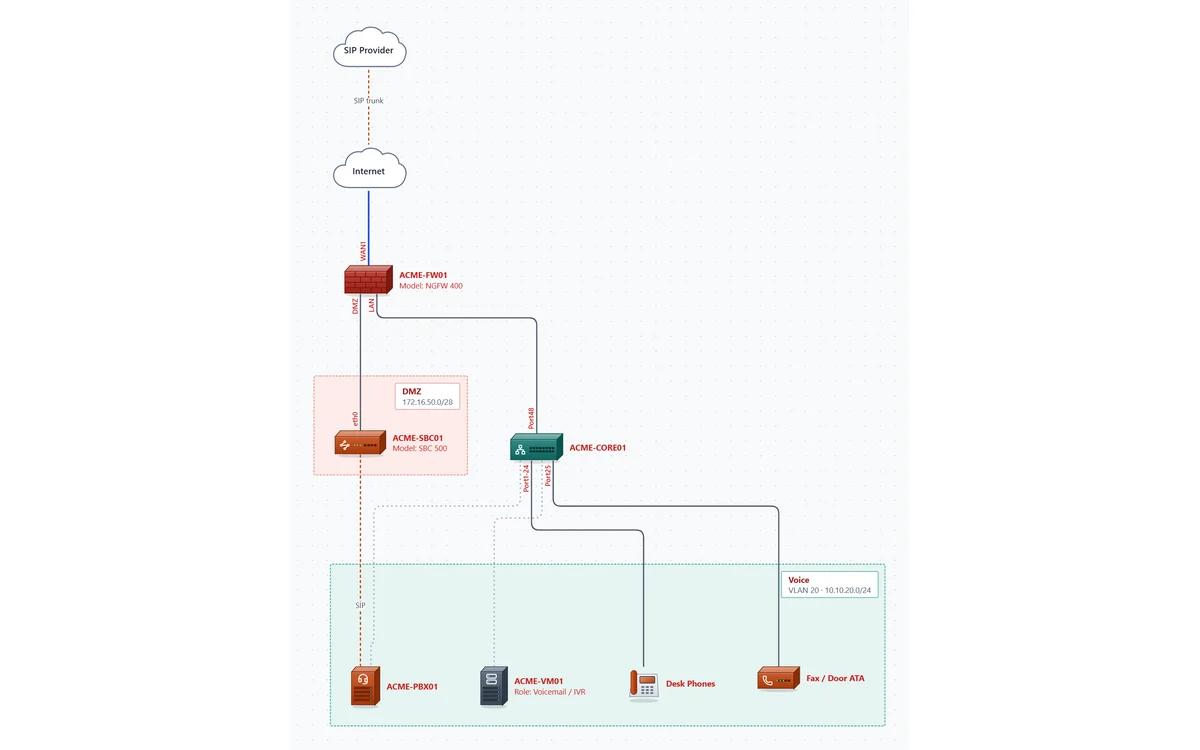
Voice network template: SIP provider, firewall, SBC in a DMZ, core switch and a voice VLAN with the PBX, voicemail server, desk phones and an ATA

Voice Network

A premises VoIP design from the SIP trunk to the desk phone. More about VoIP diagrams.

  • SIP trunk provider with DIDs, channels and signaling IPs
  • Session border controller in a DMZ security zone
  • Voice VLAN with the PBX, voicemail / IVR server, phones and an ATA
  • SIP signaling shown separately from the cabling
Open this template

Prefer to start clean? Open a blank page with just the media type key, then drag in devices or paste a device list from a spreadsheet.

On your phone? The editor is made for a computer. Email yourself a link and open the templates at your desk. Email me a link for my computer

Questions

Are the templates free?

Opening and editing them in your browser is free, with no account. Saving the file and exporting the PDF need the free 7-day trial (just your email, no credit card); trial exports carry a watermark.

Can I use them with my own equipment?

Yes. Devices are vendor-neutral, and each one has fields for hostname, management IP, model, serial and OS version, so you can document any mix of hardware.

Can I make a template of my own?

Save any diagram as a file and use it as the starting point for the next site. Files are plain JSON you keep on your computer.

Is there a Visio template I can import?

Importing Visio files isn't supported yet. Starting from one of these templates is usually the quickest way to redraw an existing site. How NetworkSketch compares with Visio.