VoIP & UC network diagrams

VoIP network diagrams that know what a SIP trunk is.

Document the voice side of a network the way it's actually built: the SIP provider and its DIDs, the session border controller in the DMZ, the firewall, the PBX or call manager, the voice VLAN and every phone and ATA behind it. Links carry their media type and port labels, and the PDF comes out with an inventory and cabling schedule.

On your phone? The editor is made for a computer. Email yourself a link and open the template at your desk. Email me a link for my computer
Opens the real editor in your browser. No account needed to look around; the free trial (no credit card) adds saving and export.
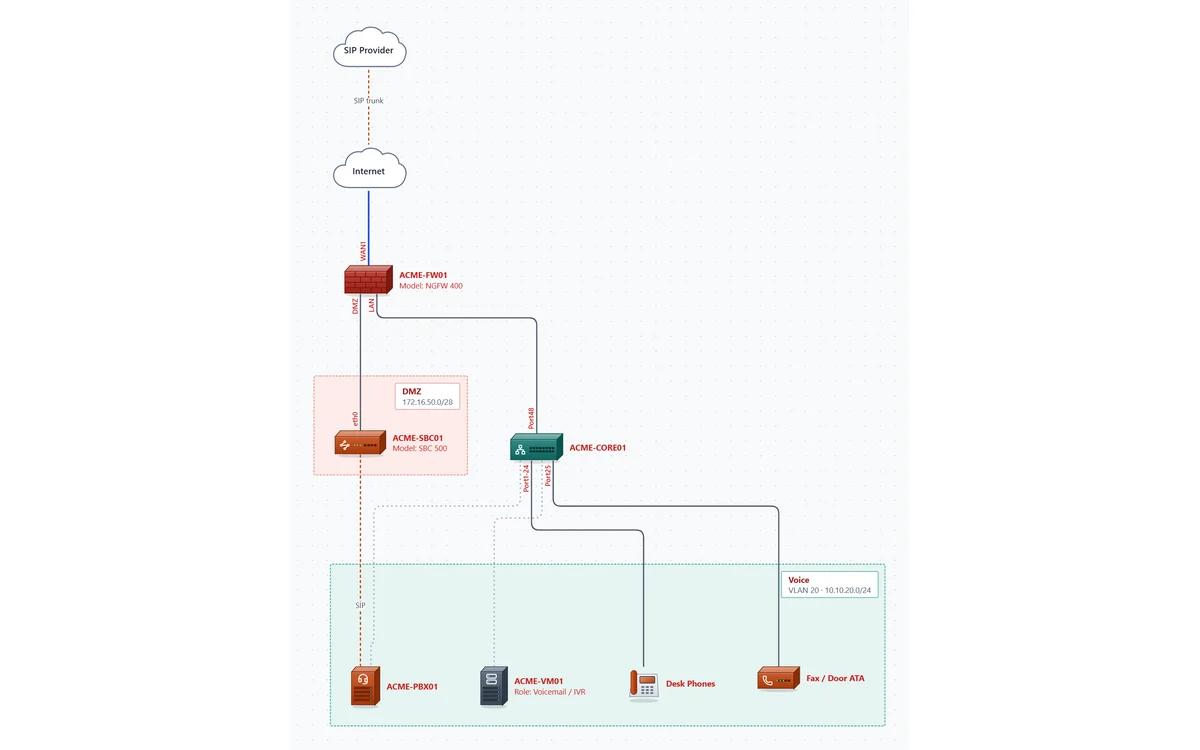
The Voice Network template: SIP provider, Internet, firewall, an SBC in a DMZ, a core switch and a voice VLAN with the PBX, voicemail server, desk phones and a fax ATA

What's in the Voice Network template

A typical premises voice design you can rename and reshape in a few minutes.

SIP trunk provider

A carrier cloud with its DID ranges, channel count and signaling IPs, joined to the Internet by a dashed SIP trunk link.

SBC in a DMZ

The session border controller sits in its own security zone with the zone's subnet, cabled to the firewall's DMZ port.

Voice VLAN

VLAN 20 with its subnet and gateway, holding the PBX / call manager, a voicemail and IVR server, 48 desk phones and a fax / door ATA.

SIP signaling path

A SIP link from the SBC to the PBX, kept separate from the physical cabling so the call path and the wiring are both clear.

Built by a voice engineer, for voice networks

Voice & UC devices

IP phones with extension and count, PBX / call manager, session border controller, voice gateway / ATA with FXS/FXO ports, SIP trunk provider and contact center platform.

Links that mean something

SIP trunks, WAN circuits, VPN tunnels, copper and fiber each have their own line style, and the media type key draws itself from what you used.

Catches the usual mistakes

The network check flags duplicate IPs, addresses outside their VLAN's subnet, ports used twice and devices left unlinked, before the customer does.

A handoff, not just a picture

Export a PDF with an engineering title block, a device inventory and a cabling schedule, or a CSV of every device.

Carrier details stay private

Signaling IPs, DIDs and public addresses never leave your computer. Diagrams are files you keep; our servers never receive them.

Vendor-neutral

Cisco, Avaya, Mitel, Teams Direct Routing, Ribbon, AudioCodes or a mix: every device has model, OS and serial fields, so any platform fits.

Documenting the call routing too?

The network diagram shows where the PBX and SBC live. The call flow (auto attendants, IVR menus, business hours, hunt groups and queues) belongs in CallSketch, which comes with every NetworkSketch plan.

See CallSketch

Questions

Can I start from my own design instead of the template?

Yes. Start from a blank page and drag in the devices you need, or add many at once by pasting rows from a spreadsheet. The template is just the quickest way to see a finished voice diagram.

Does it connect to my PBX or SBC?

No. It's a documentation tool: it never connects to your equipment. You enter what's there, and the network check reviews what you entered.

Can I show the call flow on the same diagram?

The network diagram covers devices, cabling and SIP paths. Call routing logic reads better as its own diagram, which is what CallSketch is for; one subscription covers both.

What does it cost?

Trying the editor is free with no account. The free trial runs 7 days with every feature (exports are watermarked). After that it's $9 a month billed yearly, or $15 month to month. Pricing.

See the Voice Network template in your browser.

No signup to look around. Rename the devices, add your own, and start the trial when you want the PDF.

Open the template