Updated
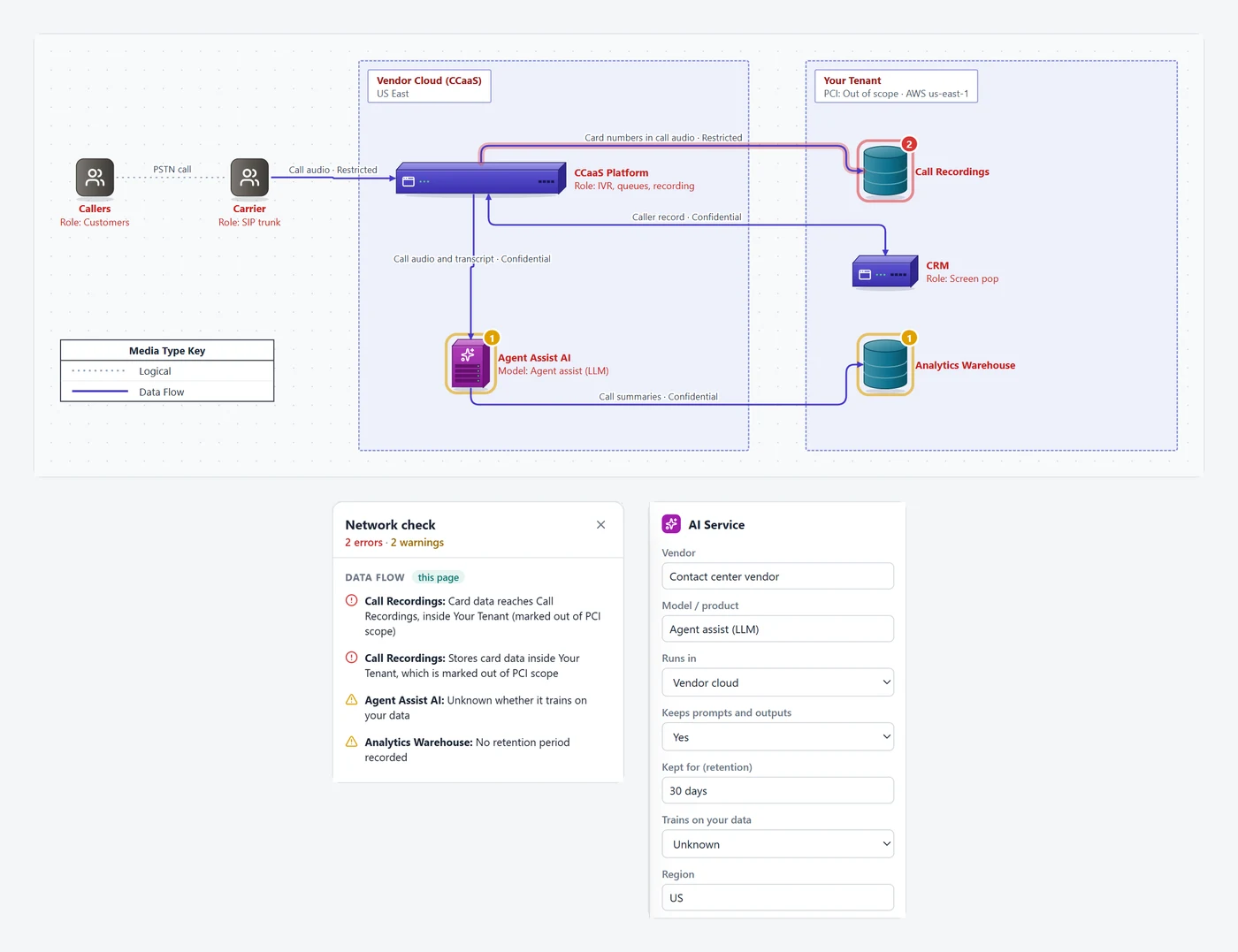
Where data starts, every system it passes through, where it's stored and for how long, and where it leaves your control. Each line records what it carries, how it's classified and how it's encrypted. AI services record whether they keep your prompts and whether they train on them. A check flags the gaps a security reviewer would find.
Whether it's a new SaaS vendor, an integration, an AI rollout or an audit, the questions are much the same.
| The question | On the diagram |
|---|---|
| What data is it, and how sensitive? | Each flow and data store has a classification (Public, Internal, Confidential, Restricted) and sensitive data tags: card data, health data, personal info, credentials, financial, biometric, or your own. |
| Where does it leave our control? | Trust boundaries around your systems, each vendor and third parties, with who controls each one and the region it's in. Every line that crosses one is a conversation. |
| Is it encrypted in transit? | Protocol and port, and the encryption on each flow: TLS 1.3, TLS 1.2, mTLS, IPsec / VPN, SSH / SFTP, other, or none. |
| Where is it stored, and for how long? | Data stores record what they hold, classification, encryption at rest, retention, region and owner. |
| Does AI ingest it? Is it kept, or used for training? | AI services record the vendor and model, where it runs, whether it keeps prompts and outputs and for how long, whether it trains on your data, the region and sub-processors. |
| Why does it go there? | A purpose on each flow, so data minimization questions have an answer on the page. |
Click Check and each finding outlines the line or box it's about. Network-only diagrams don't get these.
Card, health, personal or credential data on a flow with no encryption, or with none recorded.
Sensitive data going to an AI service that trains on it, Restricted data going to one that keeps prompts, and AI services where nobody has written down whether they do either.
A data store receiving data it doesn't list, or data classified higher than the store, plus stores with no retention period or no encryption at rest.
Sensitive data leaving a trust boundary with no purpose recorded, and flows nobody has classified.
Card data reaching, or stored in, a boundary marked out of PCI scope.
The PDF adds Data Flows, Data Stores and AI Data Use tables after the diagram, and each one exports as a CSV for a questionnaire or a risk register.
Requirement 1.2.4 asks for a data-flow diagram of all account data flows, next to the network diagram of 1.2.3. Mark each boundary in scope (CDE), connected-to or out of scope. PCI template.
A Security Rule risk analysis starts from where electronic health information is created, received, kept and sent. Tag those flows and stores Health data.
The system description and the security questionnaire both ask where customer data goes, who processes it and how it's protected.
Before a team turns on an AI assistant, a copilot or a new SaaS integration: what goes to it, whether it's kept, where, and whether it's used for training.
GDPR Article 30 records list categories of data, recipients, transfers and retention. The diagram shows the same things as a picture.
A CRM, a contact center platform, a data warehouse or a payment flow: one page that security, architecture and the vendor can all mark up.
From Data Flow in the palette, add a Trust Boundary for your environment, one for each vendor and one for anything public. Set who controls each one.
External parties (customers, partners), systems and apps, data stores and AI services, each inside the boundary it runs in.
Connect them with the Data Flow line type, in the direction data moves. Fill in what it carries, the classification, sensitive data, protocol, encryption and purpose.
Retention, encryption at rest and region for each store; for each AI service, whether it keeps prompts and outputs and whether it trains on your data.
Run Check, fix or explain each finding, Mark verified today, and export the PDF with the data flow tables.
The editor runs in your browser and diagrams are saved as files you keep. A map of where your sensitive data goes is exactly the document you don't want on another vendor's servers. Security details.
Keep the data flow as another page of the same file as the network diagram, so both print in one PDF with one title block, change log and verified date.
The diagram is a plain, documented JSON file. Keep it with the review in SharePoint or Git, and keep each version you handed over.
No diagram or tool does. Compliance depends on your controls and your assessor. The diagram is how you show reviewers where data goes and how it's protected, and the checks point out gaps before they do.
Public, Internal, Confidential and Restricted, lowest to highest. Most data policies use these four or close equivalents; map yours onto them. Sensitive data types (card data, health data, personal info, credentials, financial, biometric) are tagged separately, and you can type your own.
Not a full one. It draws trust boundaries and flags flows that cross them without a purpose, but it doesn't generate STRIDE threats or track mitigations. Teams that threat model can use it as the data flow diagram they start from.
No. The editor runs in your browser and diagrams are saved as files on your computer. Our servers never receive them, so drawing your data flows doesn't add another vendor holding them.
Yes. Put them on separate pages of the same document. PCI DSS 4.0 asks for both (requirements 1.2.3 and 1.2.4), and they print in one PDF with the same title block and verified date.
You can draw a data flow without an account. The Free plan covers diagrams of up to 10 items on one page, which fits the SaaS template. Pro ($9 a month billed yearly, or $15 month to month) adds unlimited pages and the PDF with the Data Flows, Data Stores and AI Data Use tables, plus CSVs. Every account starts with a 14-day trial of everything, no credit card.
Open the SaaS example, swap in your own systems, and run the check.
Open the example