Updated
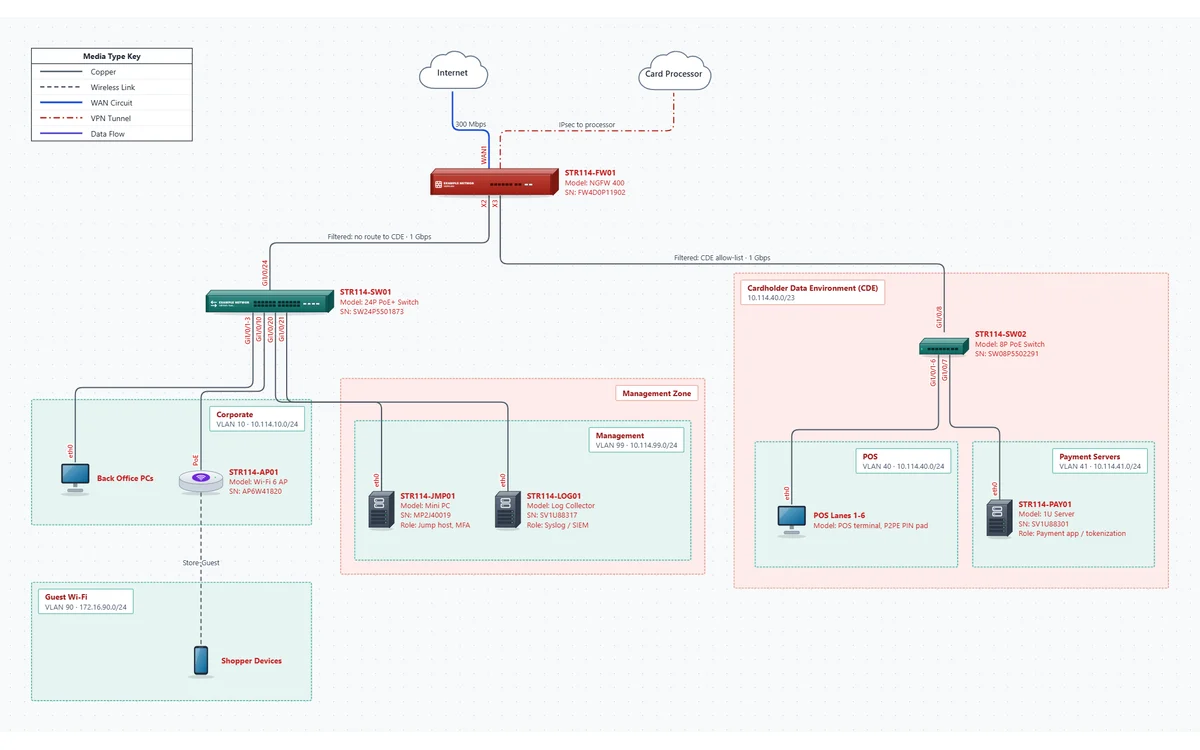
A retail store with the cardholder data environment (CDE) drawn as its own security zone, so an assessor can see what's in scope and where traffic is filtered. A second page traces card data from the POS lanes to the processor. It's a starting point for your own network, not a compliance review.
Two pages: the store network and the data flow. The devices on both pages share hostnames and IPs.
10.114.40.0/23, holding POS VLAN 40 (six lanes with P2PE PIN pads, static addressing, allow-listed MACs) and Payment Servers VLAN 41, on their own 8-port switch.
The firewall's link to the CDE switch is labeled "Filtered: CDE allow-list", its link to the store switch "Filtered: no route to CDE", and the processor is reached over an IPsec tunnel.
VLAN 99 with a jump host (the only admin path into the CDE, with MFA) and a syslog / SIEM log collector.
Corporate VLAN 10 with the back office PCs and the access point, and Guest Wi-Fi VLAN 90 with client isolation, both drawn outside the CDE.
Page 2, Data Flow: the CDE and the management zone are trust boundaries marked In scope (CDE) and Connected-to, and the card data moves along numbered data flow lines: 1. card data (P2PE encrypted) from the POS lanes to the payment server; 2. the authorization request (TLS 1.2) to the firewall; 3. IPsec to the processor. Admin sessions come only from the jump host, and audit logs (no card data) go to the log server. Each line records the data it carries, its classification, protocol, encryption and purpose, and the PDF lists them in a Data Flows table.
Assessors don't read a PCI network diagram for the boxes; they read it for the edges of the CDE. Every line that crosses the zone boundary is a connection they'll ask about, so the template labels each one with what it lets through. Systems that connect to the CDE, like the jump host and the log server, are drawn where they really are, in their own zone, because they're part of the conversation about scope.
| Requirement | What it asks for | Where it is in the template |
|---|---|---|
| 1.2.3 | An accurate network diagram showing all connections between the CDE and other networks, including any wireless networks | Store Network page: the CDE zone, every link crossing its edge, and both Wi-Fi networks outside it |
| 1.2.4 | An accurate data-flow diagram showing all account data flows across systems and networks, updated as the environment changes | Data Flow page: numbered data flow lines from POS to processor, plus the admin and logging paths, and a Data Flows table in the PDF |
| 1.3.1, 1.3.2 | Inbound and outbound CDE traffic restricted to what's necessary | Firewall links labeled with what they allow; the CDE zone's note says what's denied |
| 1.3.3 | Network security controls between all wireless networks and the CDE | The access point and guest VLAN sit behind the firewall, outside the CDE |
| 12.5.1 | An inventory of system components in scope | The PDF's device inventory: hostname, model, serial, management IP, area and location |
| 12.5.2 | Scope documented and confirmed at least every 12 months and after significant changes | The change log and the verified date in the title block |
Requirement numbers are from PCI DSS v4.0.1. Your QSA decides what satisfies them; treat this as a checklist, not a guarantee. More on what auditors ask for: network documentation for audits, and on drawing data flows for any security review: data flow diagrams.
The network diagram (1.2.3) and the data-flow diagram (1.2.4) are separate asks. The template keeps them as two pages of one file, so the same device carries the same hostname and IP on both, and the network check flags an IP given to two different devices, even on different pages. Both print in the same PDF, with the same title block and verified date.
Work from your firewall rules and your POS vendor's network requirements.
Click Open this template. No account needed; nothing you type leaves your computer.
Resize the CDE zone around your in-scope systems, set its CIDR, and use its notes to say what's denied in and out.
Click each link that crosses the CDE edge and label it with what it allows. Set the firewall interface at each end.
On the Data Flow page, draw Data Flow lines in the order card data moves and number them, with the encryption on each. Include admin and logging paths. Check flags card data sent unencrypted or reaching a boundary marked out of scope.
Hostname, model, serial, OS version and location for every in-scope device; the PDF inventory prints them.
Click Check, walk the diagram against the store, Mark verified today, and export the PDF for the assessor.
Every template opens in the same editor, so you can copy devices and areas from one into another.
No tool does. Compliance depends on your controls and your assessor. The template gives you a clear way to show the CDE boundary and the data flow, and NetworkSketch keeps the inventory, change log and verified date with the diagram.
PCI DSS 4.0 asks for a network diagram (1.2.3) and a data-flow diagram (1.2.4). In the template they're two pages of one file, so they share devices and print in one PDF.
Only on your computer. The editor runs in your browser and diagrams are saved as files you keep; our servers never receive them, so there's no new vendor to add to your scope. Security details.
Whenever connections into or out of the CDE change, and at each review of your network security controls. Add a change log line for each change and mark the diagram verified after each review.
Opening and editing it in your browser is free, with no account. Saving the file and exporting the PDF need the free 14-day trial (just your email, no credit card). After that, editing it needs Pro: it has 15 devices on two pages, more than the Free plan's 10 devices on one page. Pro is $9 a month billed yearly, or $15 month to month, and CallSketch is included.
No signup to look around. Redraw the boundary around your CDE, and start the trial when you want the PDF.
Open this template