DMZ network diagram template

DMZ network diagram: the firewall, the screened subnet and every allowed flow

Updated

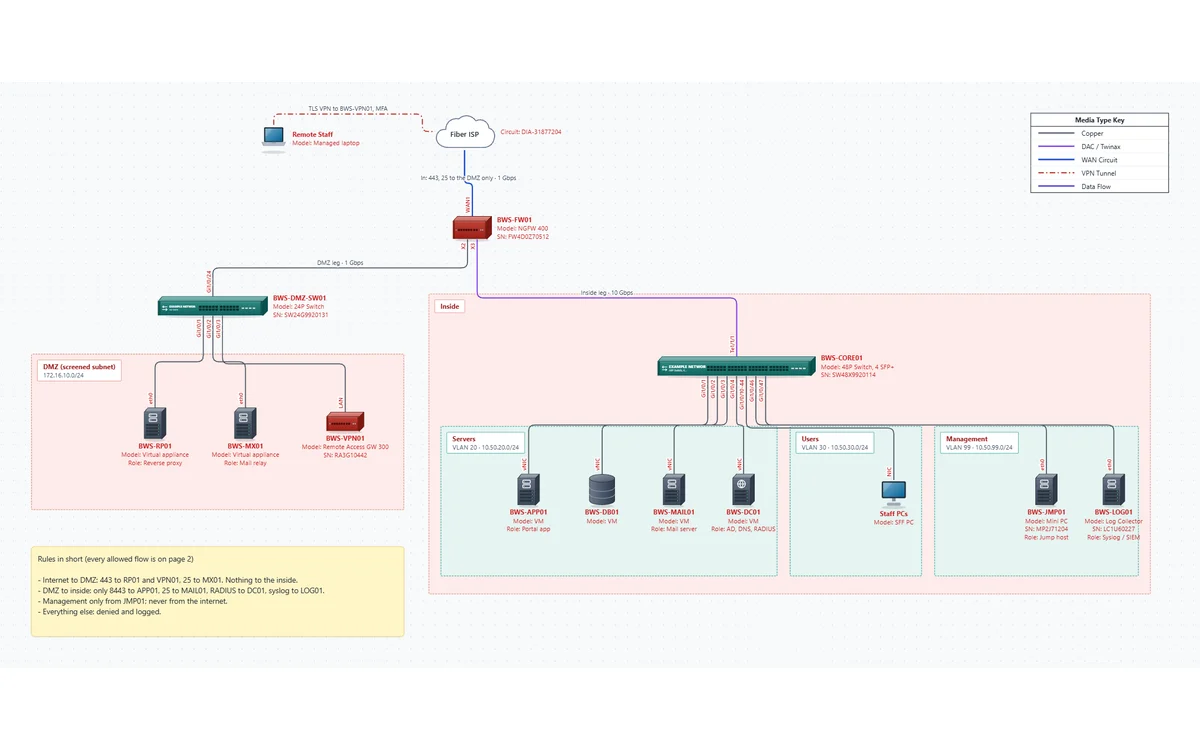
A company that hosts its own public services: a reverse proxy, a mail relay and a VPN gateway in a DMZ, the servers, users and management VLANs inside, and one firewall with three legs. A second page draws every flow the firewall allows as a numbered arrow with its port, so the diagram and the rule base can be checked against each other. A third page shows the same services behind two firewalls, back to back.

On your phone? The editor is made for a computer. Email yourself a link and open the template at your desk. Email me a link for my computer
Opens the real editor in your browser. No account needed to look around; the free 14-day trial (no credit card) adds saving and PDF export.
DMZ network diagram template: an ISP into one firewall with a DMZ leg to a dedicated switch serving a reverse proxy, mail relay and VPN gateway, and an inside leg to a core switch serving servers, users and management VLANs

What's in this template

Three pages. The devices drawn on more than one page keep the same hostname and IP.

Three-legged DMZ

One firewall: WAN1 to a 1 Gbps fiber circuit with a /28 public block, X2 to the DMZ on its own switch, X3 to the inside core over 10 Gbps. Each leg is labeled with what it lets through.

The DMZ hosts

BWS-RP01 (reverse proxy, 443), BWS-MX01 (mail relay, 25) and BWS-VPN01 (remote access with MFA, 443) on 172.16.10.0/24, each with its published public address and a note that it isn't domain-joined.

Allowed Flows page

Eight numbered arrows: three from the internet into the DMZ, four from the DMZ inward (each to one server on one port), and admin access from the jump host only. A note lists what's denied.

Back-to-back variant

The same DMZ between an outer and an inner firewall from different vendors, the inner one passing only the four inward flows and VPN client traffic. Use whichever page matches your design and delete the other.

Addressing plan

The DMZ gets its own subnet and its own switch, so a cable or VLAN mistake is far less likely to put a DMZ host on an inside network. Public addresses are translated to DMZ addresses on the firewall; record both on each host so whoever reads the diagram can match it to the NAT rules.

Zone / VLANSubnetGatewayDHCPWhat's on it
Outside203.0.113.32/28ISP, .33StaticFirewall WAN1 (.34); published: RP01 (.35:443), MX01 (.36:25), VPN01 (.37:443)
DMZ (VLAN 10)172.16.10.0/24172.16.10.1StaticBWS-RP01 (.10), BWS-MX01 (.20), BWS-VPN01 (.30). Back-to-back page: inner firewall at .254
Servers (VLAN 20)10.50.20.0/2410.50.20.1StaticBWS-DC01 (.5), BWS-APP01 (.10), BWS-DB01 (.11), BWS-MAIL01 (.12)
Users (VLAN 30)10.50.30.0/2410.50.30.1BWS-DC01, .100-.25060 staff PCs
VPN clients10.50.40.0/24BWS-VPN01BWS-VPN01Remote staff, given the Users VLAN's rules
Management (VLAN 99)10.50.99.0/2410.50.99.1StaticFirewall (.1), core (.2), DMZ switch out-of-band (.4), jump host (.20), log collector (.30); back-to-back page: outer and inner firewalls (.11, .12)

The public block is from a range reserved for documentation (RFC 5737); the rest are private (RFC 1918) addresses. Plan your own with the subnet calculator.

Example rule table

Rules 1 to 8 match the numbered arrows on the template's Allowed Flows page. Rules are read top to bottom; the last one catches everything else.

#SourceDestinationPortWhy
1Any (internet)BWS-RP01TCP 443Customer portal, published by the reverse proxy
2Any (internet)BWS-MX01TCP 25Inbound email to the relay, which filters it
3Any (internet)BWS-VPN01TCP 443Remote access, MFA required (add UDP 443 if your gateway uses it)
4BWS-RP01BWS-APP01TCP 8443The one app server the proxy fronts
5BWS-MX01BWS-MAIL01TCP 25Deliver filtered mail
6BWS-VPN01BWS-DC01UDP 1812RADIUS: check VPN sign-ins
7DMZ hostsBWS-LOG01TCP 6514Syslog over TLS, so DMZ logs survive a compromised host
8BWS-JMP01DMZ hostsTCP 22, 443Administration, from the jump host only
9VPN clientsInsideAs Users VLANRemote staff get what they'd get at their desks
10DMZ hostsInternetUDP/TCP 53, UDP 123, TCP 443 to named update hostsDNS, time and patches; nothing else outbound
11AnyAnyAnyDeny and log

Look up any port in the port numbers reference. Your products' ports may differ: an app server may listen on 443, a RADIUS server on 1645, and some VPN gateways use UDP as well as TCP.

DMZ architecture: what to decide and what to avoid

Three-legged or back-to-back

In a three-legged DMZ one firewall has at least three interfaces: outside, DMZ and inside. It's one device to buy, license and manage, and one rule base to read, which is why most small and mid-sized networks use it. The catch is that the same firewall is the only thing between the internet, the DMZ and the inside, so a flaw in it or one bad rule can expose everything.

In a back-to-back (or dual-firewall) DMZ, the DMZ sits between an outer firewall facing the internet and an inner firewall guarding the inside. Getting through the outer one only reaches the DMZ. Using two vendors means a single vulnerability doesn't open both, at the cost of two rule bases, two sets of skills and two support contracts. It's common where a regulator, an auditor or the value of the data justifies the extra work.

Either way, the DMZ should be a separate subnet, ideally on its own switch or at least its own VLAN on a switch with no inside ports, and the inside should be split into zones too. The template puts servers, users and management in separate VLANs with the firewall as their gateway, so a DMZ host that's allowed to reach one server on one port can't reach the rest.

What still belongs in a DMZ

Fewer services need one than ten years ago. Email has largely moved to hosted providers that filter inbound mail themselves, and many web apps are now published through a cloud WAF or reverse proxy, or through an identity-aware access service whose connector makes outbound connections only, so nothing on your network accepts inbound traffic. Remote access is going the same way. What tends to stay in a DMZ: on-premises apps that the public must reach and that can't move, SMTP relays for on-premises systems, VPN gateways, file transfer servers for partners, and session border controllers for VoIP. If a cloud service can front an app with no inbound port open, that's usually less to defend than a DMZ host. Draw it anyway: the connector, the cloud service and the flows belong on the diagram.

Common mistakes

MistakeWhy it hurtsInstead
DMZ hosts joined to the domainA compromised DMZ host holds domain credentials, and domain membership needs a long list of ports open to the domain controllersLocal accounts managed from the jump host; if a DMZ host must authenticate users, use a narrow protocol like RADIUS or LDAPS to one server
Any/any or "temporary" broad rulesOne DMZ compromise reaches everything the rule allows, and temporary rules rarely get removedOne source, one destination, one port per rule, each with a reason and an owner; review them yearly
Management from the internetFirewall and server admin pages exposed to the internet are a frequent way inAdmin interfaces reachable only from a management VLAN or jump host, with MFA
DMZ to database, directlyThe DMZ host gets a path to the data an attacker wants mostThe DMZ reaches an app server; only the app server reaches the database
Unrestricted outbound from the DMZMalware on a DMZ host can download tools and send data out freelyAllow DNS, NTP and named update sources only
DMZ on a VLAN of the inside switchOne wrong port setting or switch flaw puts a public-facing host on the inside networkA dedicated DMZ switch, or a switch with no inside VLANs
No logs leaving the DMZAn attacker on the host deletes the evidenceSend logs to a collector inside (flow 7), over TLS

What to label on a DMZ diagram

Each firewall interface with its zone and address, each published service with its public address and port, each allowed flow with its port and a number that matches the rule base, and the management path. In the template, a firewall's notes list its interfaces, each DMZ host's notes carry its NAT address, and the Allowed Flows page's arrows record the protocol, encryption and purpose, which the PDF prints as a table.
How to adapt it to your network

Work from the firewall's interface list, NAT table and rule base.

  1. 1

    Open the template

    Click Open this template. No account needed; nothing you type leaves your computer.

  2. 2

    Pick your design

    Keep the three-legged page or the back-to-back page, whichever you run, and delete the other.

  3. 3

    Draw the legs

    Set each firewall interface as a link with its port and label, and each zone's subnet. Put every public-facing host in the DMZ zone with its NAT address in its notes.

  4. 4

    One arrow per rule

    On the Allowed Flows page, draw a Data Flow line for each allow rule, numbered to match the rule base, with its port in the label. A flow you can't draw is a rule to question.

  5. 5

    Check it

    Fill in models, serials and management IPs, then click Check for duplicate IPs, addresses outside their subnet and flows with no purpose recorded.

  6. 6

    Review with the rules

    Mark verified today and export the PDF. At each firewall review, compare the rule base to the arrows.

Related templates

Every template opens in the same editor, so you can copy devices and areas from one into another.

Questions

What is a DMZ in networking?

A separate network segment for the systems the internet has to reach, such as a web proxy or a mail relay, with a firewall between it and the internet and between it and your internal network. If one of those systems is compromised, the attacker is in the DMZ, not on the inside.

Is a screened subnet the same as a DMZ?

Yes. "Screened subnet" is another name for a DMZ network, and newer training material often prefers it. Older texts also use "screened subnet" for the back-to-back design specifically, with the DMZ between two filtering devices.

Should DMZ servers be joined to Active Directory?

Generally no. Joining a DMZ host to the domain means opening many ports from the DMZ to the domain controllers and leaving domain credentials on a public-facing machine. Use local accounts managed from a jump host, or a narrow protocol such as RADIUS or LDAPS to a single server if the host must check users.

Is the "DMZ" setting on a home router a real DMZ?

No. On most home routers, "DMZ host" forwards every unsolicited inbound connection to one inside device. That device stays on the same network as everything else, so nothing is separated. It's closer to opening every port than to a DMZ.

Do I still need a DMZ if my apps are in the cloud?

Maybe not. If email is hosted and your apps are published through a cloud WAF, reverse proxy or an access service with outbound-only connectors, you may have nothing that accepts inbound connections. Anything on-premises that must accept them still belongs in a DMZ.

Is the template free to use?

Opening and editing it in your browser is free, with no account. Saving the file and exporting the PDF need the free 14-day trial (just your email, no credit card). After that, editing it needs Pro: it has three pages and 14 devices on the first one alone, more than the Free plan's 10 devices on one page. Pro is $9 a month billed yearly, or $15 month to month, and CallSketch is included.

Open the DMZ template in your browser.

No signup to look around. Swap in your firewall and services, and start the trial when you want the PDF.

Open this template