Updated
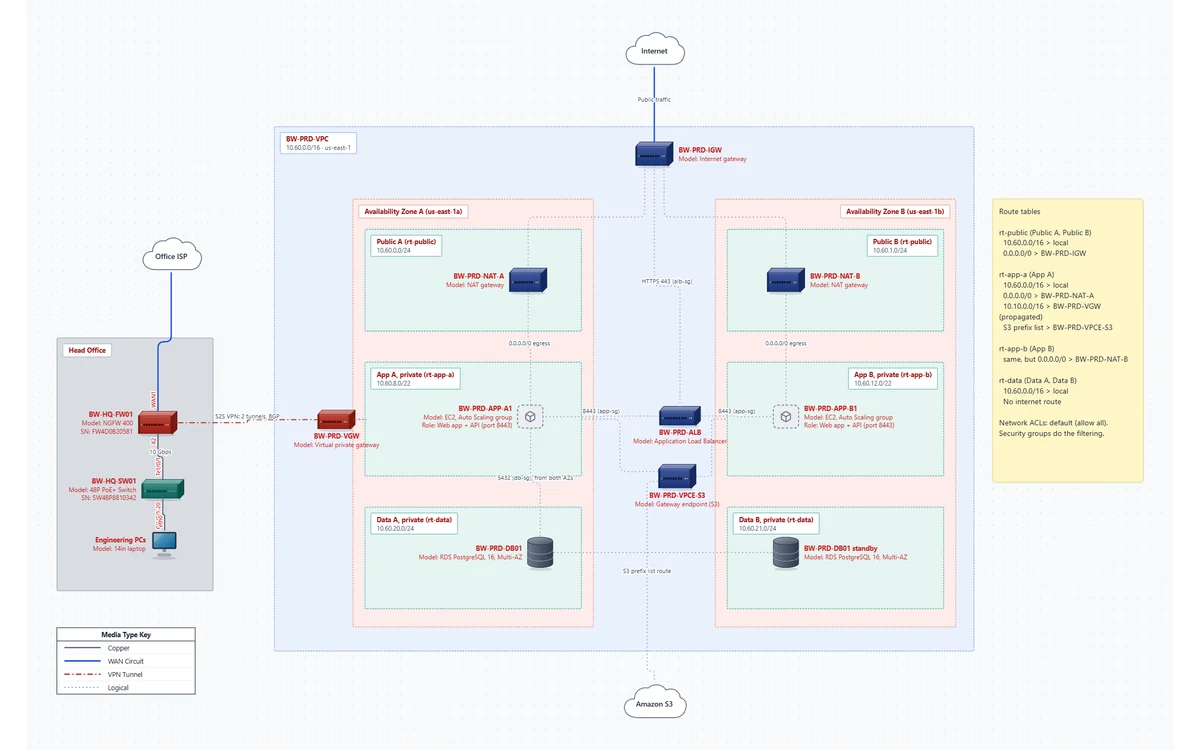
A production VPC drawn the way it's usually built: public, app and data subnets in each of two Availability Zones, an internet gateway, a load balancer, one NAT gateway per AZ, a Multi-AZ database, a gateway endpoint for S3 and a site-to-site VPN to the head office. Every subnet has its CIDR and route table, the route tables are written out on the page, and the links say which security group lets the traffic through.
One page, the whole VPC. The example company is a small software business with its production app in us-east-1.
BW-PRD-VPC (10.60.0.0/16) with Availability Zones A and B as zones. Each AZ has a public /24, a private app /22 and a private data /24, with the VPC router at .1 as the gateway.
An internet gateway for the public subnets, a NAT gateway with its Elastic IP in each public subnet, an Application Load Balancer across both, a gateway endpoint for S3 and a virtual private gateway for the VPN.
An EC2 Auto Scaling group in both app subnets and an RDS PostgreSQL Multi-AZ primary and standby. Links carry the security group chain: alb-sg on 443, app-sg on 8443, db-sg on 5432.
A note lists rt-public, rt-app-a, rt-app-b and rt-data with every route. The head office firewall is the customer gateway: its public IP, BGP ASN and the 10.10.0.0/16 it advertises are on the device.
The VPC is a /16 and uses only a small part of it. The app subnets are /22s because Auto Scaling groups and containers can use far more addresses than the server count suggests (ECS tasks and EKS pods usually get a VPC address each). The head office is 10.10.0.0/16, so nothing overlaps across the VPN.
| Subnet | AZ | CIDR | Usable | Route table | What's on it |
|---|---|---|---|---|---|
| Public A | A | 10.60.0.0/24 | 251 | rt-public | NAT gateway A (10.60.0.10), load balancer node |
| Public B | B | 10.60.1.0/24 | 251 | rt-public | NAT gateway B (10.60.1.10), load balancer node |
| App A | A | 10.60.8.0/22 | 1,019 | rt-app-a | App instances (Auto Scaling group) |
| App B | B | 10.60.12.0/22 | 1,019 | rt-app-b | App instances (Auto Scaling group) |
| Data A | A | 10.60.20.0/24 | 251 | rt-data | Database primary (10.60.20.30) |
| Data B | B | 10.60.21.0/24 | 251 | rt-data | Database standby (10.60.21.30) |
| Kept for a third AZ | C | 10.60.2.0/24, 10.60.16.0/22, 10.60.22.0/24 | Public, app and data subnets for AZ C | ||
| Unallocated | 10.60.3.0 to 10.60.7.255, 10.60.23.0 to 10.60.255.255 | Future tiers, endpoints, transit gateway attachments |
Usable counts take off the five addresses AWS reserves in every subnet. Check your own split with the VLSM planner, and run the finished plan through the IP plan checker to catch overlaps with the office.
| Route table | Destination | Target |
|---|---|---|
| rt-public | 10.60.0.0/16 0.0.0.0/0 | local Internet gateway |
| rt-app-a | 10.60.0.0/16 0.0.0.0/0 10.10.0.0/16 S3 prefix list | local NAT gateway A Virtual private gateway (propagated) S3 gateway endpoint |
| rt-app-b | Same as rt-app-a | NAT gateway B for 0.0.0.0/0 |
| rt-data | 10.60.0.0/16 | local only: no internet route |
The VPC CIDR is the one thing that's painful to change later. Pick a block that overlaps nothing you'll ever connect to: the office, other VPCs, a partner over VPN, an acquired company. A /16 per production VPC (VPC blocks can be between /16 and /28) leaves room for more AZs and more tiers. Keep a central list of which /16 belongs to which account and region.
AWS keeps five addresses in every subnet: the first four and the last. In a /24 such as 10.60.0.0/24 those are .0 (network), .1 (the VPC router), .2 (DNS), .3 (reserved for future use) and .255 (broadcast, which VPCs don't support). So a /28 gives you 11 usable addresses, not 14. The subnet calculator shows the range; subtract the three extra AWS addresses yourself.
A standard (zonal) NAT gateway, as drawn here, lives in a single Availability Zone. If both app subnets route through one NAT gateway and its AZ goes down, the other AZ loses internet access too, which is what you built two AZs to avoid. The template has one NAT gateway per AZ and one app route table per AZ, each pointing to its own NAT gateway. NAT gateways are billed by the hour and by the gigabyte they process, so a dev or test account often runs a single one and accepts the risk. AWS has also offered regional NAT gateways since late 2025: one gateway that expands to each AZ with workloads and doesn't need a public subnet. Whichever you use, write the choice on the diagram.
The S3 gateway endpoint takes S3 traffic off the NAT gateway: the route to the S3 prefix list wins over 0.0.0.0/0, and gateway endpoints have no extra charge. They only work from inside the VPC, though: servers at the office can't use one across the VPN or Direct Connect, and neither can traffic arriving through a transit gateway or a peering connection. That takes an interface endpoint.
| Security group | Network ACL | |
|---|---|---|
| Applies to | Each network interface (instance, load balancer, database) | A whole subnet |
| Rules | Allow only | Allow and deny, checked in number order |
| Return traffic | Allowed automatically (stateful) | Must be allowed explicitly (stateless) |
| Can refer to | Other security groups, prefix lists | CIDR blocks only |
AWS's own advice is to use security groups as the main control and network ACLs as a coarse, secondary guard rail. The template does that: the NACLs are left at the default and the security groups chain tier to tier (alb-sg allows 443 from anywhere, app-sg allows 8443 only from alb-sg, db-sg allows 5432 only from app-sg). Put the group and port on each link, as the template does. If you do tighten a NACL, remember it's stateless: return traffic to clients uses ephemeral ports, and NAT gateways use 1024-65535.
Every AWS Site-to-Site VPN connection has two tunnels, each with its own public IP and ending in a different AZ. Configure both on the office firewall, or the first AWS maintenance window becomes an outage. Use BGP if the firewall supports it, and record both ASNs on the diagram. A virtual private gateway is fine for one VPC. Once there are several VPCs or accounts, a transit gateway is the usual hub, so you don't end up with one VPN per VPC. See the port numbers list for the IKE and NAT-T ports the office firewall has to allow.
If the VPC is built with Terraform, CloudFormation or CDK, the code is the source of truth for detail and the diagram is the map. Draw what someone needs to reason about traffic: CIDRs, AZs, which route table each subnet uses and where its routes point, the gateways and endpoints, the security group chain between tiers and every connection that leaves the VPC. Leave out what changes on every deploy: instance IDs, Auto Scaling counts, the full rule list of each group, tags and IAM. Put the repository and stack name in the document notes so readers know where the detail lives.
AWS, Amazon VPC, Amazon S3 and Amazon RDS are trademarks of Amazon.com, Inc. or its affiliates. NetworkSketch isn't affiliated with or endorsed by Amazon Web Services, and draws with its own generic icons.
Have the VPC console or your Terraform state open in another tab.
Click Open this template. No account needed to look around. Your edits autosave in your browser.
Click the VPC area to set its CIDR and region, and rename the Availability Zone areas. Add a third AZ by copying one.
Set each subnet's name, CIDR and gateway (the .1 address). Put the route table's name in the subnet name, as the template does.
Rename the instances, database and load balancer. Use the Virtual Machine shape for EC2, Database for RDS and Load Balancer for ALB or NLB.
Edit the route table note, and label each link with the security group and port that allows it. Add any peering or transit gateway attachments.
Click Check to catch IPs outside their subnet and duplicates, then Mark verified today and export the PDF with the inventory and subnet table.
Every template opens in the same editor, so you can copy devices and areas from one into another.
The VPC and its CIDR, each Availability Zone, every subnet with its CIDR and route table, the gateways that route tables point to (internet gateway, NAT gateways, VPC endpoints, the VPN or transit gateway), the main workloads in each subnet, and which security group allows which traffic between tiers. Connections to on-premises networks should show the far end's address space, public IP and BGP ASN.
Five. In 10.60.8.0/22, for example, AWS reserves 10.60.8.0 (network address), 10.60.8.1 (VPC router), 10.60.8.2 (reserved by AWS; the VPC's DNS server itself is 10.60.0.2), 10.60.8.3 (reserved for future use) and 10.60.11.255 (broadcast, which VPCs don't support). A /24 leaves 251 usable addresses, and the smallest subnet AWS allows, a /28, leaves 11.
For production with standard (zonal) NAT gateways, usually yes. A zonal NAT gateway lives in one Availability Zone, so if private subnets in every AZ share one and that AZ goes down, the other AZs lose internet access. AWS recommends a zonal NAT gateway per AZ with each AZ's private route table pointing to its own. Since late 2025 AWS also offers regional NAT gateways, which expand across AZs on their own. Each NAT gateway is billed by the hour and by the data it processes, so some teams accept a single NAT gateway in development accounts.
No. The template is drawn with the editor's own generic icons: routers for gateways, a load balancer, virtual machines, a database and areas for the VPC, Availability Zones and subnets. NetworkSketch isn't affiliated with or endorsed by Amazon Web Services.
No. It doesn't connect to AWS or to any other account. You enter what's there, or paste a device list from a spreadsheet. That also means your cloud topology never reaches our servers: the editor runs in your browser and diagrams are saved as files on your computer. Security details.
Opening and editing it in your browser is free, with no account. Saving the file and exporting the PDF need the free 14-day trial (just your email, no credit card). After that, editing it needs Pro: it has 13 devices on one page, more than the Free plan's 10 devices on one page. Pro is $9 a month billed yearly, or $15 month to month, and CallSketch is included.
No signup to look around. Set your CIDRs and route tables, and start the trial when you want the PDF.
Open this template