Updated
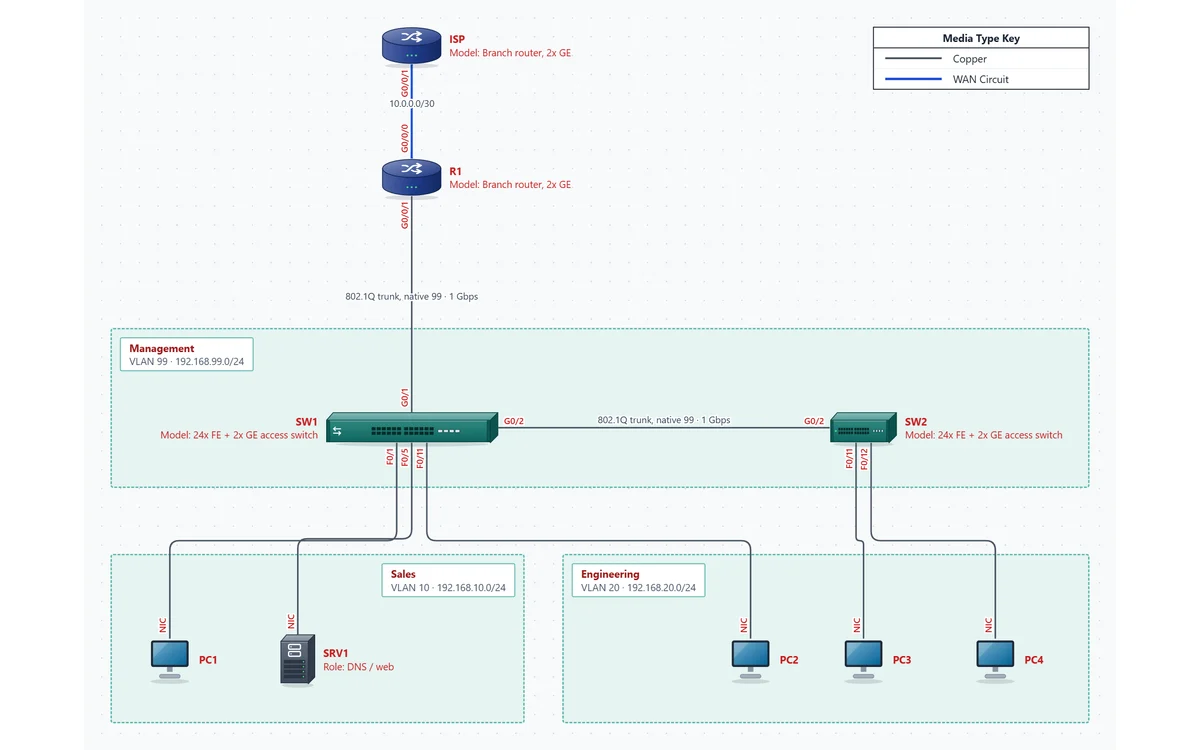
The topology behind most CCNA inter-VLAN routing labs: R1 routing for three VLANs over one trunk, SW1 and SW2 joined by an 802.1Q trunk with native VLAN 99, PCs and a server in Sales and Engineering, and an ISP router for the default route. Interface names are on every link, and the PDF's inventory and VLAN table double as the addressing table. At 9 devices on one page it fits the Free plan, so after the trial you can keep building and exporting labs like this one as PNGs, free.
One page, the size of a lab sheet. For students handing in a lab and instructors who want a clean topology to teach from.
Subinterfaces G0/0/1.10, .20 and .99 are the gateways for each VLAN (99 is native). G0/0/0 sits at 10.0.0.2/30 toward the ISP, with a default route and PAT.
R1 to SW1 G0/1, and SW1 G0/2 to SW2 G0/2, both carrying VLANs 10, 20 and 99 with native VLAN 99. Each switch is managed on interface VLAN 99.
PC1 and SRV1 (DNS / web) in Sales VLAN 10 on SW1 F0/1 and F0/5; PC2 on SW1 F0/11 and PC3, PC4 on SW2 F0/11-12 in Engineering VLAN 20.
An ISP router on 10.0.0.0/30, with a loopback (192.168.255.1/32) standing in for the Internet, so the default route has a destination.
This is the plan the template's devices carry. Each device's management IP and notes hold these values, and the PDF prints them as a device inventory and a VLAN / subnet table.
| Device | Interface | IP address | Subnet mask | Default gateway |
|---|---|---|---|---|
| R1 | G0/0/0 | 10.0.0.2 | 255.255.255.252 | N/A |
| R1 | G0/0/1.10 | 192.168.10.1 | 255.255.255.0 | N/A |
| R1 | G0/0/1.20 | 192.168.20.1 | 255.255.255.0 | N/A |
| R1 | G0/0/1.99 (native) | 192.168.99.1 | 255.255.255.0 | N/A |
| ISP | G0/0/1 | 10.0.0.1 | 255.255.255.252 | N/A |
| ISP | Lo0 | 192.168.255.1 | 255.255.255.255 | N/A |
| SW1 | VLAN 99 | 192.168.99.11 | 255.255.255.0 | 192.168.99.1 |
| SW2 | VLAN 99 | 192.168.99.12 | 255.255.255.0 | 192.168.99.1 |
| PC1 | NIC | 192.168.10.11 | 255.255.255.0 | 192.168.10.1 |
| SRV1 | NIC | 192.168.10.10 | 255.255.255.0 | 192.168.10.1 |
| PC2 | NIC | 192.168.20.11 | 255.255.255.0 | 192.168.20.1 |
| PC3 | NIC | 192.168.20.12 | 255.255.255.0 | 192.168.20.1 |
| PC4 | NIC | 192.168.20.13 | 255.255.255.0 | 192.168.20.1 |
| VLAN | Name | Subnet | Ports |
|---|---|---|---|
| 10 | Sales | 192.168.10.0/24 | SW1 F0/1, F0/5 |
| 20 | Engineering | 192.168.20.0/24 | SW1 F0/11; SW2 F0/11, F0/12 |
| 99 | Management (native) | 192.168.99.0/24 | Native on the trunks: SW1 G0/1, G0/2; SW2 G0/2 |
Every course and instructor grades a little differently, so follow your lab sheet first. The network check helps with the slips that cost points: a host IP outside its VLAN's subnet, the same address used twice, or one switch port used by two cables.
Use it for the lab you just built in Packet Tracer, CML, GNS3 or on real gear.
Click Open this template. No account needed to look around.
Rename devices to your lab's hostnames, then click each link and set the interface at each end.
Set each device's IP and put interface details in its notes. Set each VLAN area's ID, name, subnet and gateway.
Drag in more PCs or a third switch, drop each host into its VLAN area, and cable it to an access port.
Click Check to catch duplicate IPs, hosts outside their VLAN's subnet and ports used twice before you hand it in.
Export a PDF or a PNG of the page. The free 14-day trial exports the PDF; after it, the Free plan still exports this lab as a PNG.
Every template opens in the same editor, so you can copy devices and areas from one into another.
No. It draws and documents the network; it doesn't run IOS or pass traffic. Build and test the lab in Packet Tracer, CML, GNS3 or on real gear, and document it here.
Moving the native VLAN off VLAN 1 to an unused management VLAN is common CCNA lab practice: untagged traffic stays off the user VLANs. In this template the switches are also managed on VLAN 99.
Yes. Open the template on a projector with no account, change it live, and hand students the sample PDF as the reference topology and addressing table.
Opening and editing it in your browser is free, with no account. Saving the file and exporting the PDF need the free 14-day trial (just your email, no credit card). After that it stays free to edit on the Free plan: it has 9 devices on one page, within the Free plan's 10. Pro, at $9 a month billed yearly or $15 month to month, adds the PDF and has no limits, and CallSketch is included.
No signup to look around. Match it to your lab sheet, then export it for your report.
Open this template