Data center network diagram template

Data center network diagram template, down to the rack unit and the cable

Updated

Two 42U racks in a data hall row: ISP handoffs through fiber patch panels, an active / passive firewall pair, two core switches joined by an MLAG peer link, a top-of-rack switch in each rack, hypervisor hosts, an all-flash array, PDUs and a row UPS. Every device carries its rack and U position, and every cable its media, speed, ID, length and test result.

On your phone? The editor is made for a computer. Email yourself a link and open the template at your desk. Email me a link for my computer
Opens the real editor in your browser. No account needed to look around; the free 14-day trial (no credit card) adds saving and PDF export.
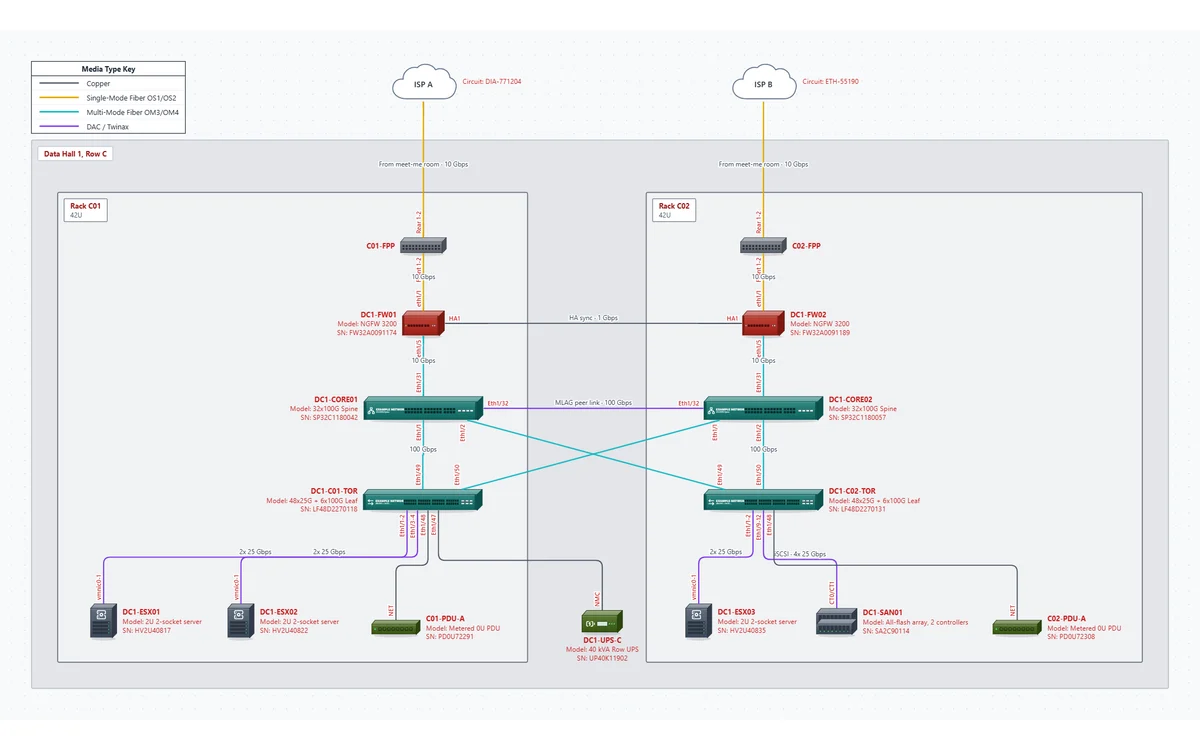
Data center rack row template: two racks with fiber patch panels, a firewall pair, core switches with a peer link, top-of-rack switches, hypervisor hosts, a storage array, PDUs and a row UPS

What's in this template

One page for the row, built for a server room, colocation cage or small data hall.

Two racks, one row

Data Hall 1, Row C (raised floor, hot aisle containment), with racks C01 and C02 as areas. Locations read like "Hall 1, Row C, C01, U40".

Firewall HA pair

DC1-FW01 active and DC1-FW02 passive, each fed by its own 10 Gbps DIA circuit from the meet-me room through an OS2 patch panel at U42, with an HA1 sync link between them.

Core pair and top of rack

Two 32x100G core switches at U38 with a 100 Gbps DAC peer link. Each core has a 100 Gbps OM3/OM4 uplink to both top-of-rack switches.

Compute, storage and power

Three hypervisor hosts on 2x 25 Gbps DAC, a dual-controller array (184 TB usable) on 4x 25 Gbps iSCSI, metered PDUs with panel and breaker, and a 40 kVA row UPS.

Rack positions, HA pairs and MLAG on one page

Rack and U. Each device's Location field holds hall, row, rack and U ("Hall 1, Row C, C02, U10-13") and prints in the PDF inventory, and the rack areas keep each rack's devices together on the page. NetworkSketch doesn't draw a front-view rack elevation; this diagram is about how things connect. If you need elevations, keep them in your DCIM and use the same hostnames.

HA pairs. Draw both members of every pair and the link between them. The template's firewalls have an HA pair / peer field ("Active, peer DC1-FW02") and a cabled HA1 link, so the inventory says which unit is which and the cabling schedule shows the sync port.

MLAG. With MLAG (or vPC, or a stack), the two cores act as one switch to the devices below, so each top-of-rack switch has one uplink to each core. Show the peer link and both uplinks: that cross is what tells the next engineer that losing a core doesn't isolate a rack. The template draws the cross-rack uplinks as straight lines so they read as an X.

Some of the cabling in the template

LinkMediaSpeedCable IDLength
ISP A to C01-FPP (from the meet-me room)Single-mode10 GbpsMMR-C01-0138 m
C01-FPP Front 1-2 to DC1-FW01 eth1/1Single-mode10 GbpsC01-F0012 m
DC1-FW01 HA1 to DC1-FW02 HA1 (HA sync)Copper1 GbpsC01-C02-0013 m
DC1-FW01 eth1/5 to DC1-CORE01 Eth1/31OM3/OM410 GbpsC01-F0102 m
DC1-CORE01 Eth1/32 to DC1-CORE02 Eth1/32 (MLAG peer link)DAC100 GbpsC01-C02-D013 m
DC1-CORE01 Eth1/1 to DC1-C01-TOR Eth1/49OM3/OM4100 GbpsC01-F0202 m
DC1-CORE01 Eth1/2 to DC1-C02-TOR Eth1/49OM3/OM4100 GbpsC01-C02-F0225 m
DC1-C02-TOR Eth1/9-12 to DC1-SAN01 CT0/CT1 (iSCSI)DAC4x 25 GbpsC02-D1102 m

Every link in the template has ports at both ends; most also carry a certification test result. The full list is the cabling schedule in the sample PDF.

How to adapt it to your network

Easiest with a rack walk sheet or your DCIM export next to you.

  1. 1

    Open the template

    Click Open this template. No account needed to look around.

  2. 2

    Lay out the row

    Rename the hall, row and racks and set each rack's units. Select a rack area and press Ctrl+D to add the next rack.

  3. 3

    Place every device

    Set hostname, model, serial and asset tag, and put hall, row, rack and U in Location. Paste rows from a spreadsheet for a full rack.

  4. 4

    Keep pairs as pairs

    Fill in the HA peer on both firewalls. If you run two top-of-rack switches per rack, duplicate the ToR and split the host uplinks between them.

  5. 5

    Cable it

    For each link, set the media (single-mode, OM3/OM4, DAC, copper), speed, the port at each end, and the cable ID, length and test result.

  6. 6

    Check and export

    Click Check to catch a port used twice or a duplicate IP, then export the PDF with the inventory and cabling schedule.

Related templates

Every template opens in the same editor, so you can copy devices and areas from one into another.

Questions

Can it draw a rack elevation?

No. There's no front-view, unit-by-unit rack drawing. Rack and U positions are recorded on each device and printed in the inventory, and racks are areas on the diagram.

Can I show A and B power feeds?

The template has one metered PDU per rack with its panel and breaker. Add a second PDU the same way for the B feed, with its own circuit, and it appears in the inventory.

Does it discover the devices for me?

No. It doesn't scan or connect to your network. Paste a device list from a spreadsheet, or import from SolarWinds Orion if you use it.

Is the template free to use?

Opening and editing it in your browser is free, with no account. Saving the file and exporting the PDF need the free 14-day trial (just your email, no credit card). After that, editing it needs Pro: it has 15 devices, more than the Free plan's 10 devices on one page. Pro is $9 a month billed yearly, or $15 month to month, and CallSketch is included.

Open the data center template in your browser.

No signup to look around. Rename the racks, place your gear, and start the trial when you want the PDF.

Open this template