Updated
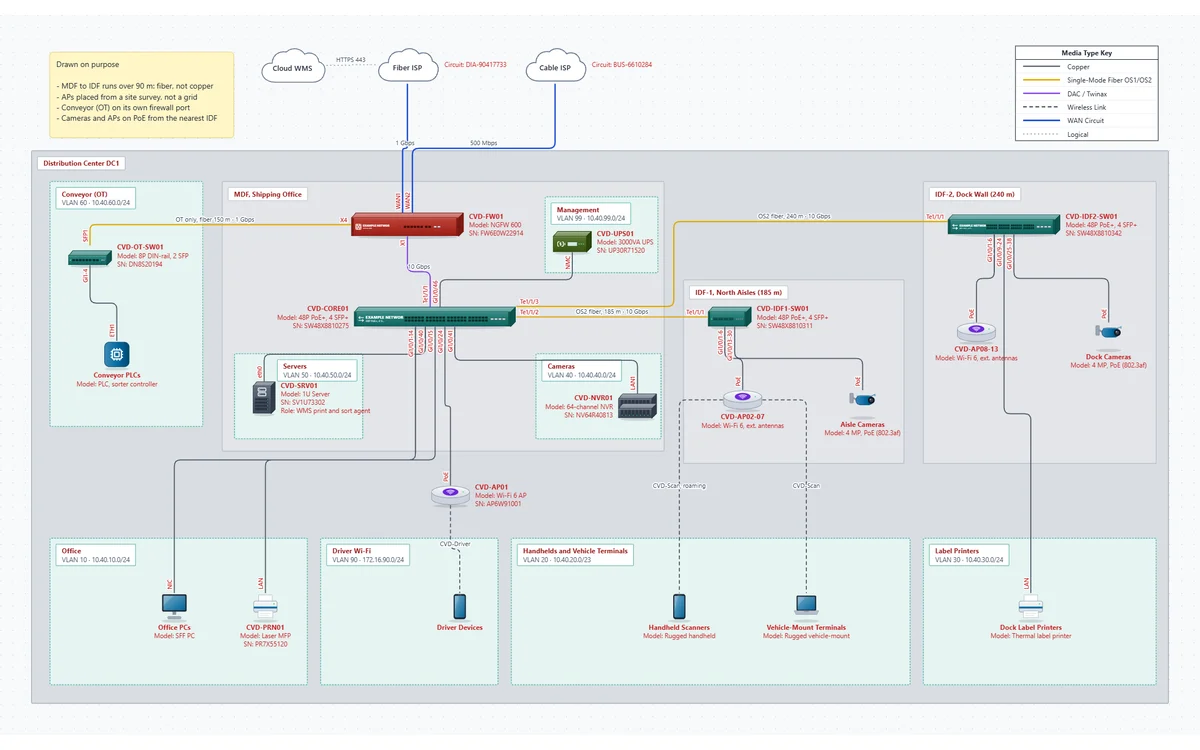
A distribution center drawn the way it's actually cabled: the MDF in the shipping office, two IDFs at the far end of the floor over single-mode fiber because they're 185 m and 240 m away, Wi-Fi for handheld scanners and forklift terminals, a label printer at every dock door, cameras, and the conveyor controls on their own firewall port. The WMS runs in the cloud over two internet circuits.
One page for the whole building, with a room for each wiring closet and an area for each VLAN.
A 1 Gbps fiber circuit and a 500/50 Mbps cable circuit on WAN1 and WAN2 of one firewall, a 48-port PoE+ core switch with four SFP+ ports, the WMS print agent, a 64-channel NVR and a 3000VA UPS, all with rack units, serials and asset tags.
IDF-1 on the north aisles (185 m) and IDF-2 on the dock wall (240 m), each a 48-port PoE+ switch on a 10 Gbps OS2 uplink with its cable ID and test result. Each feeds six high-mount access points and the cameras near it.
45 handheld scanners and 12 vehicle-mount terminals on their own /23, 16 thermal label printers (one per dock door) on static addresses, and 32 PoE cameras recording to the NVR.
The conveyor PLCs and a DIN-rail switch sit on VLAN 60, on a dedicated firewall interface over their own fiber. They can reach one server and nothing on the internet. Truck drivers get a separate, isolated Wi-Fi.
The firewall is the gateway for every VLAN, so anything moving between VLANs passes a rule. That costs a little firewall throughput and buys you one place to see and control what the scanners, cameras and conveyor can reach. Camera video stays inside VLAN 40 because the NVR is in it.
| VLAN | Name | Subnet | Gateway | DHCP | What's on it |
|---|---|---|---|---|---|
| 10 | Office | 10.40.10.0/24 | 10.40.10.1 | Firewall, .100-.199 | 14 office PCs, the office printer (.30) |
| 20 | Handhelds and Vehicle Terminals | 10.40.20.0/23 | 10.40.20.1 | Firewall, 10.40.20.50-10.40.21.250 | 45 handheld scanners, 12 forklift terminals, room to double |
| 30 | Label Printers | 10.40.30.0/24 | 10.40.30.1 | Static | 16 dock door printers, .11-.26 (door number + 10) |
| 40 | Cameras | 10.40.40.0/24 | 10.40.40.1 | Static | NVR (.10), 18 aisle and 14 dock cameras |
| 50 | Servers | 10.40.50.0/24 | 10.40.50.1 | Static | WMS print and sort agent, NTP (.10) |
| 60 | Conveyor (OT) | 10.40.60.0/24 | 10.40.60.1 (firewall X4) | Static | OT switch (.2), four PLCs (.11-.14) |
| 90 | Driver Wi-Fi | 172.16.90.0/24 | 172.16.90.1 | Firewall, client isolation | Truck drivers in the lounge, internet only |
| 99 | Management | 10.40.99.0/24 | 10.40.99.1 | Static | Firewall, switches (.2-.4), UPS (.5), access points (.11-.23) |
Check your own plan with the IP plan checker, or size the subnets with the VLSM planner. A /23 for handhelds is deliberate: scanners, spares, terminals and seasonal devices add up faster than you'd expect.
| Role | In the template | Why |
|---|---|---|
| Firewall | NGFW with two WAN ports, SFP+ and a spare port for OT | Two circuits, the gateway for every VLAN, and a separate interface so the conveyor never shares a VLAN with anything else |
| Core switch | 48-port PoE+, 4 x SFP+ | Office ports and PoE, plus 10 Gbps fiber to each IDF |
| IDF switches | 48-port PoE+, 740 W budget, 4 x SFP+ | Six APs and up to 18 cameras each, with headroom for more |
| MDF to IDF cabling | OS2 single-mode fiber, 10GBASE-LR optics | The runs are 185 m and 240 m. Single-mode leaves room for 25G and 100G later |
| Access points | Wi-Fi 6 with external antenna ports | Directional antennas can aim coverage down the aisles instead of into the racking |
| OT switch | 8-port DIN-rail industrial switch | Mounts in the conveyor control panel and tolerates its heat and dust |
| Enclosures and power | Sealed wall cabinets, a UPS in the MDF and each IDF | Dust, temperature swings and forklifts are the warehouse's real threats to the network |
Twisted-pair Ethernet is specified for a 100 m channel: 90 m of permanent link from the patch panel to the outlet, plus 10 m of patch cords. In a building 200 m long, one closet can't reach the far wall. Put an IDF wherever devices would otherwise be more than about 90 m of cable away, and connect it back to the MDF with fiber. Measure the cable path, not the floor plan: a run that goes up to the tray, along the aisle and back down a rack upright is much longer than the straight line.
Multi-mode OM4 fiber carries 10GBASE-SR up to 400 m, so it would reach both IDFs here. Single-mode OS2 with 10GBASE-LR goes 10 km and is the safer choice when the cable has to last through the next two speed upgrades. Use the fiber loss calculator to check the loss budget and the fiber distance chart for each optic's reach. For a single far device, such as a camera on a yard pole, an outdoor-rated switch or a media converter with fiber back to an IDF is cheaper than a new closet.
Racking, metal and stock change how radio travels, and they change with the inventory: an aisle of paper towels behaves differently from an aisle of bottled water, and a full rack differs from an empty one. Ceiling-mounted omnidirectional APs at 10 m or more spend much of their signal on the roof and the top of the racking, so warehouse designs often mount APs lower, on rack uprights or drop poles, and use directional antennas aimed down the aisles. What works depends on your building, your racking and your devices, so treat any rule of thumb as a starting point. Get a site survey: a predictive design from the floor plan and racking layout, then an on-site validation with the scanners you actually use, ideally with the racks stocked.
A scanner is useless if it drops its session every time a picker turns into a new aisle, and a terminal on a reach truck moves faster than a person. Use one SSID for these devices across the whole building, check which fast roaming methods your scanners support (802.11r, 802.11k and 802.11v support varies by model and OS version), and test roaming with real devices while driving the routes. Turning off the lowest data rates helps clients move to a nearer AP instead of clinging to a distant one. Keep the AP inventory and mounting positions in each AP's location field so the next survey starts from what's there.
Conveyor and sortation PLCs often run old firmware and are maintained by an outside integrator. Give them their own VLAN on their own firewall interface, allow only the flows the WMS integration needs (here, the sort agent on CVD-SRV01 and NTP), block internet access, and turn on the integrator's VPN access per job rather than leaving it open. Then ransomware on an office laptop has no direct network path to the conveyor.
Budget PoE per IDF switch, not per building. 802.3af cameras are allocated up to 15.4 W at the switch port and 802.3at APs up to 30 W; newer APs may need 802.3bt for every radio to run at full power, so check the datasheet. IDF-2 here carries six APs and 14 cameras, about 400 W at the maximums, inside its 740 W budget. Try your own numbers in the PoE budget calculator. Warehouses are dusty and often unheated, and forklifts hit things: use sealed or filtered cabinets rated for the space, a UPS in each closet, protection where cable drops run down rack uprights, and enclosures for printers at the dock doors.
Every IDF, every fiber run with its length and test loss, every AP with its aisle and mounting height, and every dock printer with its door number. The template's cable IDs (CVD-F001 for fiber, CVD-N and CVD-S for the runs from IDF-1 and IDF-2) print in the PDF's cabling schedule, so the label on the cable matches the line in the document. For copper terminations, see the Ethernet color code.
Start with the floor plan and a walk of every closet.
Click Open this template. No account needed; nothing you type leaves your computer.
Rename the MDF and IDF rooms, add one for each closet you have, and put the real distance from the MDF in each room's name or notes.
For each fiber run, set the media, speed, ports, cable ID, length and test result. Anything over 90 m of copper is a sign you need another IDF.
Group APs by the IDF that powers them, note mounting height and aisle in Location, and attach the survey report's AP list in the notes.
Rename the VLAN areas and set each subnet, gateway and DHCP scope. Move the conveyor, cameras and printers into theirs, then click Check for addresses outside their subnet and duplicate IPs.
Fill in models and serials, Mark verified today, and export the PDF with its device inventory, cabling schedule and VLAN table.
Every template opens in the same editor, so you can copy devices and areas from one into another.
There's no reliable count per square foot. It depends on ceiling height, racking layout, what's stored, and which devices have to roam. Scanners need little bandwidth, so warehouse Wi-Fi is usually designed for coverage and roaming in every aisle rather than capacity. The template's 12 floor APs for a 220 m x 110 m building is an example, not a rule. Get a site survey before you buy.
100 m for the whole channel: up to 90 m of permanent cable plus 10 m of patch cords. Farther than that, add an IDF with a fiber uplink, or use an outdoor or industrial switch with fiber back to the nearest closet.
Yes. They talk to the WMS and little else, there are a lot of them, and they're easy to lose. A VLAN of their own (with its own SSID) lets the firewall limit them to the WMS and updates, and keeps a lost scanner away from the office network.
No. Put PLCs and other OT on their own VLAN behind a dedicated firewall interface, allow only the flows the WMS integration needs, block the internet, and give the integrator remote access only when there's a job.
Opening and editing it in your browser is free, with no account. Saving the file and exporting the PDF need the free 14-day trial (just your email, no credit card). After that, editing it needs Pro: it has 20 devices, more than the Free plan's 10 devices on one page. Pro is $9 a month billed yearly, or $15 month to month, and CallSketch is included.
No signup to look around. Swap in your building, and start the trial when you want the PDF.
Open this template