Updated
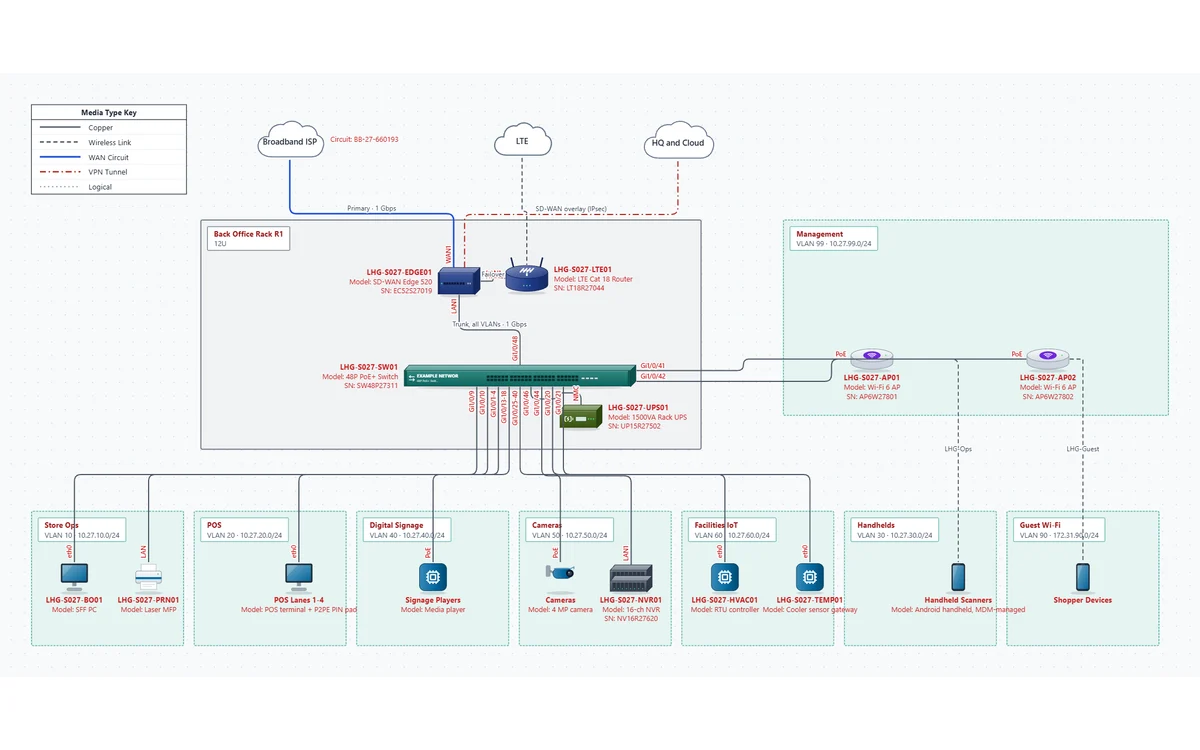
One store of a chain, drawn as the build every location gets: an SD-WAN edge with broadband and an LTE backup, one PoE+ switch in a small back office rack, and a VLAN for each kind of device: POS lanes, the back office, handheld scanners, digital signage, cameras, coolers and HVAC, guest Wi-Fi and management. The store number is in every hostname and IP. A second page shows how each store reaches HQ and the cloud.
Two pages in one file: the store, and the chain around it. Devices on both pages share hostnames and IPs.
A 1 Gbps cable circuit on WAN1 and an LTE router on WAN2 (failover only) into an SD-WAN edge, with an IPsec overlay to the HQ hubs. Circuit ID and the ISP's support account on the circuit.
Rack R1 (12U): the edge, the LTE router, a 48-port PoE+ switch and a 1500VA UPS, each with its U position, serial and asset tag, and every cable with an ID, length and test result.
Store Ops 10, POS 20, Handhelds 30, Signage 40, Cameras 50, Facilities IoT 60, Guest 90 and Management 99, each with its subnet, gateway and DHCP source.
The HQ data center with the SD-WAN hub, POS back office and inventory servers, the payment processor, cloud apps, the SD-WAN orchestrator that pushes the store template, and "every other store" built the same way.
The store number is the second octet and the VLAN ID is the third: Store 027 is 10.27.<VLAN>.0/24, Store 028 is 10.28.<VLAN>.0/24. Every store gets the same VLAN IDs, the same gateways (.1 on the edge) and the same switch ports, so one firewall policy and one switch config template fit them all. That scheme stops at 255 stores; a bigger chain gives each store a /20 or a /19 out of 10.0.0.0/8 and keeps the VLAN offsets the same. Guest Wi-Fi uses the same 172.31.90.0/24 everywhere, because it never routes to HQ.
| VLAN | Name | Subnet | Gateway | DHCP | What's on it |
|---|---|---|---|---|---|
| 10 | Store Ops | 10.27.10.0/24 | 10.27.10.1 | Edge, .100-.199 | Manager PC, back office printer |
| 20 | POS | 10.27.20.0/24 | 10.27.20.1 | Static, allow-listed MACs | 4 POS lanes with P2PE PIN pads |
| 30 | Handhelds | 10.27.30.0/24 | 10.27.30.1 | Edge | 12 MDM-managed scanners on the 802.1X LHG-Ops SSID |
| 40 | Digital Signage | 10.27.40.0/24 | 10.27.40.1 | Edge | 6 media players (window, endcaps, checkout) |
| 50 | Cameras | 10.27.50.0/24 | 10.27.50.1 | Reservations | 16 cameras and the NVR |
| 60 | Facilities IoT | 10.27.60.0/24 | 10.27.60.1 | Static | Rooftop unit controller, cooler and freezer sensor gateway |
| 90 | Guest Wi-Fi | 172.31.90.0/24 | 172.31.90.1 | Edge, client isolation | Shopper devices, straight to the internet |
| 99 | Management | 10.27.99.0/24 | 10.27.99.1 | Static | Edge, switch, LTE router, UPS, access points |
Plan your own blocks with the VLSM planner, then paste the plan into the IP plan checker to catch overlaps between stores.
| Role | Example spec in the template | Why |
|---|---|---|
| SD-WAN edge | Two WAN ports, zone-based firewall, centrally managed | Gateway for every VLAN, failover between circuits, one template pushed to every store |
| LTE router | Cat 18 LTE, external roof antenna, pooled data plan | Keeps payments and the overlay up when the broadband circuit drops |
| Switch | 48 x 1G PoE+, 740 W budget | One switch for the whole store: 2 APs, 16 cameras, 6 signage players and spare ports |
| Access points | Wi-Fi 6, sales floor and stockroom | Handheld scanners need coverage in the stockroom and at the dock, not just the sales floor |
| UPS | 1500VA, network card on VLAN 99 | Rides through short outages and tells HQ when the store is on battery |
| NVR | 16 channels, 30 days | Recording stays in the store; only clips cross the WAN |
The cheapest store network to run is the one that's identical everywhere: same hardware, same port map, same VLAN IDs, same hostnames with only the store number changed. Then a config template does the work, a spare from any store fits any other, and the NOC can read a problem off an IP address. Draw the standard build once, keep it as the master file, and copy it for each store, changing only the store number, address, circuit details and serials. Stores that differ (a mall kiosk, a flagship) get their own documented variant rather than quiet one-off changes.
Put the LTE router (or the edge's built-in modem) on a different carrier from the broadband circuit's backhaul where you can, with the antenna where the signal is good, which is often the roof, not the back office. Decide what runs on LTE: payments, the overlay to HQ and the POS back office yes; guest Wi-Fi, signage content downloads and camera uploads no, or the data plan is gone in a day. Test failover on a schedule by pulling the primary, and alert when a store has been on LTE for more than a few minutes.
POS lanes get their own VLAN and talk only to what they need: the payment processor, the POS back office at HQ and their own update service. Nothing else in the store can reach them, and the guest network has no route to anything internal. Handhelds, signage and coolers are where attackers look for a way in, because they're the least patched devices in the building, so they get their own VLANs too.
Under PCI DSS, segmentation isn't required, but without it every system on the store network is in scope for your assessment. The diagram an assessor asks for shows the cardholder data environment (CDE), what connects to it, and where card data flows. That's a different drawing from this one. Use the PCI network diagram template for the CDE zone, the management zone with its jump host, and the card data flow page; keep this one as the store's general network map.
A separate SSID isn't isolation. Guest gets its own VLAN that breaks out to the internet at the store, client isolation on the APs so shoppers can't see each other, a bandwidth limit so it can't starve the POS, and no route to HQ or any store VLAN. Handhelds use an 802.1X SSID; never put store devices on the guest network because it was easier to join.
When a store goes down, the person on site is a store manager or a field tech on the phone with your NOC. Label every device with its hostname, every patch cord at both ends, and tape the port map inside the rack door. Use the same ports in every store (Gi1/0/1-4 for POS, Gi1/0/41-42 for APs, Gi1/0/48 to the edge) and a cord color per VLAN. Keep the circuit ID and the carrier's support number in the diagram, so "read me the label on the black box" turns into a ticket with the ISP in one call. The rack elevation planner helps lay out the 12U, and the PoE budget calculator checks the switch against cameras, APs and signage.
Build the master once, then copy it per store.
Click Open this template. No account needed; nothing you type leaves your computer.
Change the hardware models, VLAN IDs and port map to your standard build. This file becomes the master.
Set each VLAN's subnet using your store-number scheme, then click Check for addresses outside their subnet and ports used twice.
Save a copy for each store. Change the store number in hostnames and IPs, the address in Document Settings, the circuit ID and the serials.
Put the circuit ID, bandwidth and the ISP's support account on the ISP device, and the LTE carrier on the LTE router.
Mark verified today and export the PDF with the device inventory and cabling schedule; tape the port map in the rack and keep the file with the store record.
Every template opens in the same editor, so you can copy devices and areas from one into another.
Most stores need separate VLANs for POS, the back office, handheld scanners, cameras, guest Wi-Fi and management, and often digital signage and facilities IoT (HVAC, coolers). Use the same VLAN IDs in every store so one firewall policy fits all of them.
If the store can't take card payments without the internet, yes. An LTE router or an edge with a built-in modem keeps payments and the link to HQ up when the broadband circuit drops. Limit what runs over LTE so the data plan lasts, and test failover on a schedule.
Not on its own. This is the store's general network map. For PCI DSS scoping, use the PCI network diagram template, which draws the cardholder data environment as its own zone and adds a card data flow page.
Keep one master file for the standard build and a copy per store that differs only in the store number, address, circuits and serials. Change the master when the standard changes, and use the change log and verified date in each file to see which stores were checked.
Opening and editing it in your browser is free, with no account. Saving the file and exporting the PDF need the free 14-day trial (just your email, no credit card). After that, editing it needs Pro: it has 23 devices on two pages, more than the Free plan's 10 devices on one page. Pro is $9 a month billed yearly, or $15 month to month, and CallSketch is included.
No. The editor runs in your browser and diagrams are saved as files on your computer, so our servers never receive them. Security details.
No signup to look around. Swap in your store number and hardware, and start the trial when you want the PDF.
Open this template