Azure network diagram template

Azure hub and spoke network diagram template

Updated

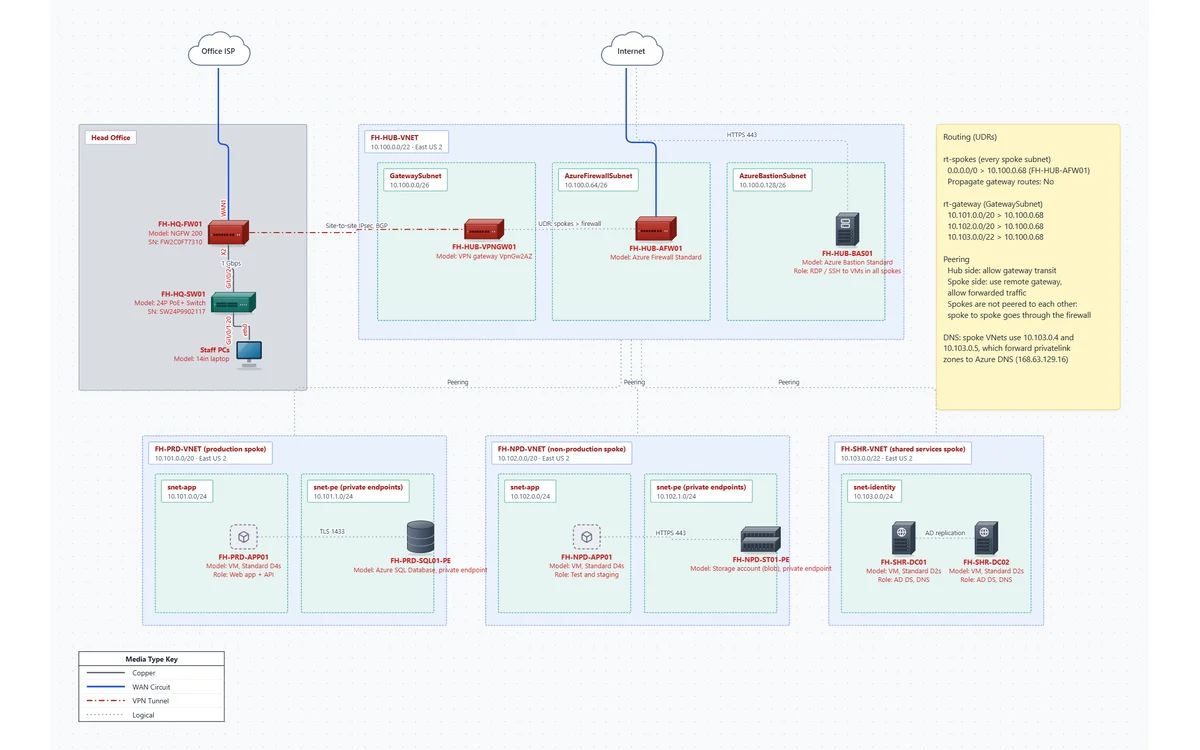
The hub-spoke network topology Azure teams usually start with: a hub VNet holding the VPN gateway, Azure Firewall and Bastion in their required subnets, production, non-production and shared services spokes peered to it, user-defined routes that send spoke traffic through the firewall, private endpoints for PaaS services and a site-to-site VPN to the head office. Every VNet and subnet has its address space, and the routing and peering settings are written on the page.

On your phone? The editor is made for a computer. Email yourself a link and open the template at your desk. Email me a link for my computer
Opens the real editor in your browser. No account needed to look around; the free 14-day trial (no credit card) adds saving and PDF export.
Azure hub and spoke template: a hub VNet with GatewaySubnet, AzureFirewallSubnet and AzureBastionSubnet, a site-to-site VPN from the head office firewall to the VPN gateway, and production, non-production and shared services spoke VNets peered to the hub with app subnets, private endpoint subnets and domain controllers

What's in this template

One page, one region. The example company runs its production app, its test environment and its domain controllers in Azure.

The hub VNet

FH-HUB-VNET (10.100.0.0/22) with GatewaySubnet, AzureFirewallSubnet and AzureBastionSubnet, each a /26. In them: an active-active VPN gateway, Azure Firewall (private IP 10.100.0.68) and Bastion.

Three spokes

Production (10.101.0.0/20) and non-production (10.102.0.0/20), each with an app subnet and a private endpoint subnet, and shared services (10.103.0.0/22) with two domain controllers that also serve DNS.

Routing and peering

A note lists the spoke route table (0.0.0.0/0 to the firewall, gateway route propagation off), the GatewaySubnet route table, both sides of the peering settings and the DNS setup.

Office and PaaS

The head office firewall over a site-to-site IPsec VPN with BGP, and Azure SQL and a storage account reached through private endpoints, with their privatelink DNS zones noted.

The address plan

Each VNet gets its own block, and none overlaps another VNet or the office (10.20.0.0/16). That isn't just tidiness: Azure won't peer two VNets whose address spaces overlap. All of the Azure ranges fall inside 10.100.0.0/14, so the office firewall can route one summary to the VPN.

VNetSubnetCIDRUsableWhat's on it
Hub (10.100.0.0/22)GatewaySubnet10.100.0.0/2659VPN gateway, active-active (10.100.0.4, .5)
HubAzureFirewallSubnet10.100.0.64/2659Azure Firewall (10.100.0.68), the next hop in every UDR
HubAzureBastionSubnet10.100.0.128/2659Bastion
HubFree10.100.0.192/26, 10.100.1.0 to 10.100.3.255DNS resolver, ExpressRoute later, management
Production (10.101.0.0/20)snet-app10.101.0.0/24251App VMs
Productionsnet-pe10.101.1.0/24251Private endpoint for Azure SQL (10.101.1.4)
Non-production (10.102.0.0/20)snet-app10.102.0.0/24251Test and staging VMs
Non-productionsnet-pe10.102.1.0/24251Private endpoint for blob storage (10.102.1.4)
Shared services (10.103.0.0/22)snet-identity10.103.0.0/24251Domain controllers and DNS (10.103.0.4, .5)

Usable counts take off the five addresses Azure reserves in every subnet: the network address, .1 (default gateway), .2 and .3 (Azure DNS) and the last address. Plan the split with the VLSM planner and check for overlaps with the IP plan checker.

Design guidance for Azure hub and spoke

Why hub and spoke

The hub holds the things every workload needs and you only want to pay for and run once: the connection to the office, the firewall that inspects outbound and cross-network traffic, Bastion for admin access and usually DNS. Each spoke holds one workload or one environment, often in its own subscription, so teams can work in their spoke without touching shared networking. Microsoft's Cloud Adoption Framework recommends this topology, with one hub per region and each spoke peered to the hub in its own region.

Peering is not transitive

Peering connects exactly two VNets. Spokes peered to the same hub can't reach each other through it, and a spoke can't reach the office through the hub's gateway unless you set up gateway transit. The template handles both:

Azure picks the longest matching prefix, so a more specific system route (such as a peering route) beats a broad UDR. When traffic skips the firewall, check the effective routes on the VM's network interface first. If two spokes exchange a lot of trusted traffic, such as database replication, peering them directly saves the firewall's processing cost; draw that peering on the diagram.

Subnets with required names

Subnet nameForSizeRules
GatewaySubnetVPN and ExpressRoute gateways/27 or larger; /26 leaves room for ExpressRouteNothing else in it, no NSG, no 0.0.0.0/0 UDR
AzureFirewallSubnetAzure Firewall/26No NSG
AzureBastionSubnetAzure Bastion (all but the Developer offering)/26 or largerNothing else in it, no UDR

The names are exact, case included; Azure looks for them when you deploy the service. Size them for growth from the start.

Private endpoints and DNS

A private endpoint gives a PaaS service (Azure SQL, a storage account, Key Vault) a private IP in your spoke, so traffic stays off the internet and you can turn off the service's public network access. The part people get wrong is DNS: the service's name has to resolve to the private IP. Link the privatelink DNS zones (privatelink.database.windows.net, privatelink.blob.core.windows.net) to the VNet your DNS servers sit in, and have those servers forward to Azure DNS at 168.63.129.16. The office DNS then needs conditional forwarders to the same servers, or users at the office resolve the public address.

Cost, roughly

The hub isn't free to run even when nothing uses it. Azure Firewall, VPN and ExpressRoute gateways and Bastion are billed by the hour, and the firewall also charges per gigabyte it processes. Peering charges for data in and out on each side, so traffic that crosses the hub to another spoke pays for peering twice plus the firewall. None of that is a reason to skip the design, but price it in the Azure pricing calculator with your own traffic before you commit, and note which SKU each service runs on the diagram.

Virtual WAN, the managed alternative

Azure Virtual WAN gives you a hub that Microsoft builds and routes for you, with branch VPN, ExpressRoute and SD-WAN connections and hub-to-hub routing across regions. It's worth a look when you have many branches or regions. A hub you build yourself, as here, gives more control over routing and over which firewall or network virtual appliance sits in the middle. On a diagram the two look much the same: a hub, spokes and the connections to the office.

What to draw, and what to leave to code

Draw every VNet and subnet with its range, the hub services and their private IPs, which way each peering's gateway settings point, the route tables and their next hops, private endpoints, and every connection to the office with its ASN and public IP. Leave the individual NSG and firewall rules, VM sizes that change and resource IDs to Bicep, Terraform or the portal, and put the repository name in the document notes.

Microsoft, Azure, Azure Firewall, Azure Bastion and Azure Virtual WAN are trademarks of the Microsoft group of companies. NetworkSketch isn't affiliated with or endorsed by Microsoft, and draws with its own generic icons.
How to adapt it to your network

Have the portal's virtual network list, or your Bicep or Terraform, open in another tab.

  1. 1

    Open the template

    Click Open this template. No account needed to look around. Your edits autosave in your browser.

  2. 2

    Set the hub

    Click the hub VNet to set its address space and region, then set each subnet's range. Keep the required subnet names as they are.

  3. 3

    Match your spokes

    Rename the spoke VNets, set their ranges, and copy a spoke for each extra workload. Draw a Peering link from the hub to each new spoke.

  4. 4

    Swap in your workloads

    Rename the VMs and private endpoints and set their private IPs. Use Database or Storage for PaaS services reached through private endpoints.

  5. 5

    Write the routing

    Edit the note with your route tables, peering settings and DNS servers. Put the office firewall's public IP, ASN and prefixes on the device.

  6. 6

    Check and export

    Click Check to catch IPs outside their subnet and duplicates, then Mark verified today and export the PDF with the inventory and subnet table.

Related templates

Every template opens in the same editor, so you can copy devices and areas from one into another.

Questions

Is Azure VNet peering transitive?

No. If spoke A and spoke B are both peered to the hub, A still can't reach B through the peerings. Either peer the two spokes directly, put them in a Virtual Network Manager connected group, or do what this template does: send spoke traffic to the firewall in the hub with user-defined routes and let the firewall route and filter it.

Which Azure subnets need a specific name?

The VPN or ExpressRoute gateway must go in a subnet named GatewaySubnet (/27 or larger; Microsoft's hub-spoke guidance suggests /26). Azure Firewall needs AzureFirewallSubnet (at least /26) and Azure Bastion needs AzureBastionSubnet (/26 or larger), except the Bastion Developer offering. Don't put anything else in those subnets.

How many IP addresses does Azure reserve in each subnet?

Five: the network address, the first address for the default gateway, the next two for Azure DNS, and the last (broadcast) address. A /24 leaves 251 usable addresses, a /26 leaves 59, and the smallest subnet Azure allows, a /29, leaves 3.

Should I use Azure Virtual WAN instead?

Virtual WAN is Microsoft's managed version of the hub: Microsoft runs the hub and its routing, which helps when you have many branches, several regions or SD-WAN. A hub you build yourself, like this one, gives you more control over routing and which firewall or network virtual appliance you run, and can cost less for a single region. The diagram looks much the same either way.

Does NetworkSketch use the official Azure icons?

No. The template is drawn with the editor's own generic icons: a firewall, a VPN gateway, servers, virtual machines and areas for the VNets and subnets. NetworkSketch isn't affiliated with or endorsed by Microsoft. It doesn't connect to your Azure subscription either, so your cloud topology never reaches our servers: the editor runs in your browser and diagrams are saved as files on your computer.

Is the template free to use?

Opening and editing it in your browser is free, with no account. Saving the file and exporting the PDF need the free 14-day trial (just your email, no credit card). After that, editing it needs Pro: it has 12 devices on one page, more than the Free plan's 10 devices on one page. Pro is $9 a month billed yearly, or $15 month to month, and CallSketch is included.

Open the Azure hub and spoke template in your browser.

No signup to look around. Set your address spaces and routes, and start the trial when you want the PDF.

Open this template