Updated
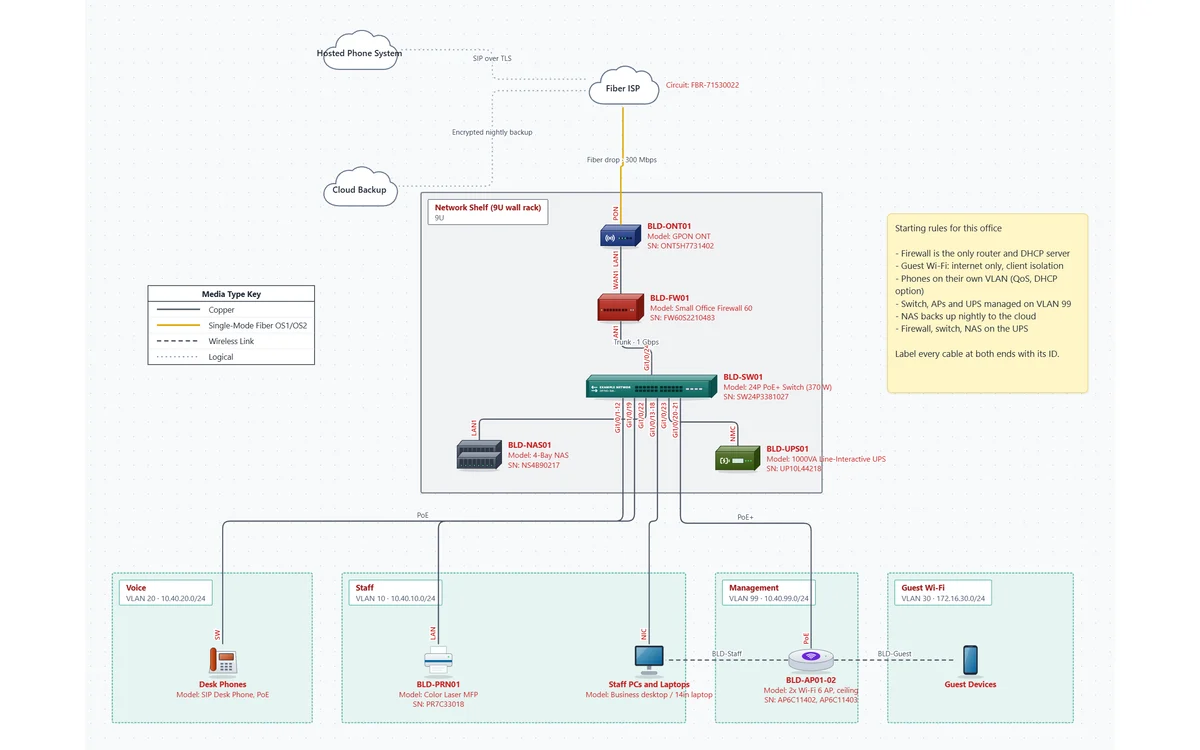
The network most small businesses actually need, drawn on one page: a fiber circuit into one firewall, one PoE switch, two access points, a NAS, a printer and hosted desk phones, with staff, voice, guest Wi-Fi and management on separate VLANs. Every device has its model, serial and IP, and every cable its port and ID. It has 10 devices, so it fits the Free plan.
One page. The example is a 12-person design studio; swap in your own names and it fits most offices of 5 to 20 people.
A 300/300 Mbps fiber ISP with its circuit ID, static IP and support number, the ISP's ONT in bridge mode, and the two cloud services a small office leans on: a hosted phone system and a cloud backup for the NAS.
Firewall, 24-port PoE+ switch (370 W budget), a 4-bay NAS (RAID 5, 30 daily snapshots) and a 1000VA UPS that keeps the internet, switch and NAS up through short outages and shuts the NAS down cleanly.
Staff 10, Voice 20, Guest Wi-Fi 30 (internet only, client isolation) and Management 99, each with its subnet, gateway and DHCP range. The firewall routes between them and hands out every address.
Switch ports 1-12 to the desk phones, 13-18 to wired PCs, 19 to the printer, 20-21 to the two access points, 22-23 to the NAS and UPS, 24 to the firewall. Cable IDs and test results on each run.
The template's plan, as it appears in the PDF's VLAN table. It uses 10.40.x.0/24 rather than 192.168.0.x or 192.168.1.x, because those are what most home routers hand out: staff who connect over a VPN from home would end up with the same subnet on both ends, and traffic for the office goes nowhere.
| VLAN | Name | Subnet | Gateway | DHCP | What's on it |
|---|---|---|---|---|---|
| 10 | Staff | 10.40.10.0/24 | 10.40.10.1 | Firewall, .100-.199 | 12 PCs and laptops (wired and Wi-Fi), NAS at .20, printer at .30 (reservation) |
| 20 | Voice | 10.40.20.0/24 | 10.40.20.1 | Firewall, .100-.199 | 12 desk phones, extensions 101-112 |
| 30 | Guest Wi-Fi | 172.16.30.0/24 | 172.16.30.1 | Firewall, client isolation | Visitors' phones and laptops, internet only |
| 99 | Management | 10.40.99.0/24 | 10.40.99.1 | Static | Firewall .1, switch .2, UPS .5, access points .11 and .12 |
A /24 per VLAN is plenty for an office this size and keeps the numbers easy to read: the third octet is the VLAN ID. Check your own plan for overlaps with the IP plan checker, or split a bigger block with the VLSM planner and the subnet calculator.
| Role | In the template | What to look for |
|---|---|---|
| Firewall / router | Small office firewall, one WAN, VLAN subinterfaces | Throughput above your circuit speed with the security features you'll use turned on (the datasheet's "threat protection" figure, not the bare firewall figure), VLANs, DHCP per VLAN, a VPN with MFA |
| Switch | 24-port managed PoE+ switch, 370 W | Managed (VLANs, a voice VLAN, port descriptions), PoE+ on every port that feeds an AP or phone, a budget with headroom (see below) |
| Wi-Fi | Two Wi-Fi 6 ceiling APs | Centrally managed, separate staff and guest SSIDs mapped to VLANs, WPA3 or WPA2/WPA3 for staff |
| Storage | 4-bay NAS, RAID 5 | Snapshots, a built-in backup job to the cloud, UPS shutdown support |
| Power | 1000VA line-interactive UPS | Enough runtime to ride out short outages, and a USB or network link so the NAS shuts down before the battery runs out |
| Phones | PoE SIP desk phones on a hosted phone system | The provider's supported models; PoE class from the datasheet for the budget |
A flat network works until a guest's laptop, a printer with old firmware or a compromised PC can see the NAS. Four VLANs cover a typical office: staff (PCs, printer, NAS), voice (so phones get their own DHCP settings and the firewall can prioritize them), guest (internet only, with client isolation so visitors can't see each other) and management (the switch, APs, UPS and firewall admin pages, reachable only from IT's machines). Add a cameras / IoT VLAN when you have cameras, door controllers or smart TVs, and a servers VLAN once there is more than a NAS. More than that rarely pays off at this size.
The firewall should be the only router. It routes between the VLANs, so it is where the rules live: guest to internet only, voice to the phone provider, staff to the NAS and printer, nothing to management except the admin's PC.
A switch's PoE budget is the total power it can deliver across all ports. Plan with each device's PoE class maximum at the switch: Class 2 is 7 W, Class 3 is 15.4 W, Class 4 (PoE+, 802.3at) is 30 W. In the template, 12 phones (plan 7 W each) and two Wi-Fi 6 APs (plan 30 W each) come to 144 W, well inside 370 W, which leaves room for cameras later. A 24-port switch with a 190 W budget would also work today; a cheap one with 65 W would not. Run your own numbers in the PoE budget calculator.
Mount APs on the ceiling in the middle of the space they serve, not in the network closet or above a metal cabinet. For an open office of a few thousand square feet, two APs is a common starting point: one in the open work area and one covering the meeting room and reception. Walls, glass, people and the number of devices matter more than square footage, so walk the office with a phone afterwards and check signal and speed where people sit. Use the same SSIDs on both APs so devices roam, and put the staff SSID on VLAN 10 and the guest SSID on VLAN 30 on the same trunk port.
The circuit ID and the ISP's support number (you'll want them during an outage, when you can't look them up online). Model, serial and management IP for every device, for warranty claims and remote access. The switch port and VLANs on every link. The DHCP range on every VLAN. Where each device physically is. And a verified date, so the next person knows whether to trust it.
A NAS with RAID survives a failed disk, not a deleted folder, ransomware or a burst pipe. The template keeps 30 days of snapshots on the NAS for quick restores and an encrypted nightly copy in a cloud backup service, so there is always a copy outside the office. Test a restore every few months. Put the ONT, firewall, switch and NAS on the UPS; desk phones powered by the switch stay up with it, so a short power blip doesn't drop calls.
Bring the ISP's account details, a photo of the closet and your switch's port list.
Click Open this template. No account needed to look around, and nothing you type leaves your computer.
In Document Settings, set the company name, address and author for the title block. Rename devices to your own scheme (site code, role, number).
Click each device and set its vendor, model, serial and management IP. Delete what you don't have (phones, NAS) and change the counts on the grouped PCs and phones.
Edit each VLAN area's ID, subnet, gateway and DHCP range so the PDF's VLAN table matches the firewall.
For each link, set the switch port, the VLANs it carries and the cable ID. Click Check to catch a port used twice or an IP outside its VLAN.
Mark verified today, then export the PDF with its device inventory, VLAN table and cable schedule, and keep the file somewhere the next person will find it.
Every template opens in the same editor, so you can copy devices and areas from one into another.
Every device with its role, model and IP; the internet circuit with its ID and support number; each VLAN with its subnet, gateway and DHCP range; and the switch port and cable ID on each link. Add where each device is (closet, shelf, ceiling) and the date someone last checked it against the real office. That is what the next technician needs during an outage.
Usually three or four: staff, guest Wi-Fi and management, plus voice if you have IP phones. Add a cameras or IoT VLAN when you have those devices. Each VLAN is only useful if the firewall has rules between them; guest should reach the internet and nothing else.
Not at this size. A small office firewall does routing, NAT, DHCP for each VLAN, the VPN and the security rules in one box. Put the ISP's modem or ONT in bridge mode so only your firewall does NAT.
Add up each powered device's PoE class maximum: 7 W for a Class 2 desk phone, 15.4 W for Class 3, 30 W for a PoE+ access point. Twelve phones and two APs plan at 144 W, so a 24-port switch with a 190 W or larger budget fits, with room to grow. Our PoE budget calculator does the sums.
On your computer. The editor runs in your browser and diagrams are saved as files you keep; our servers never receive them. Security details.
Opening and editing it in your browser is free, with no account. Saving the file and exporting the PDF need the free 14-day trial (just your email, no credit card). After that it stays free to edit on the Free plan: it has 10 devices on one page, exactly the Free plan's 10, so remove or group a device before adding another. Pro, at $9 a month billed yearly or $15 month to month, adds the PDF and has no limits, and CallSketch is included.
No signup to look around. Swap in your own gear and addresses, and start the trial when you want the PDF.
Open this template