Cyber insurance network diagram template

Cyber insurance network diagram template: show the controls your application claims

Updated

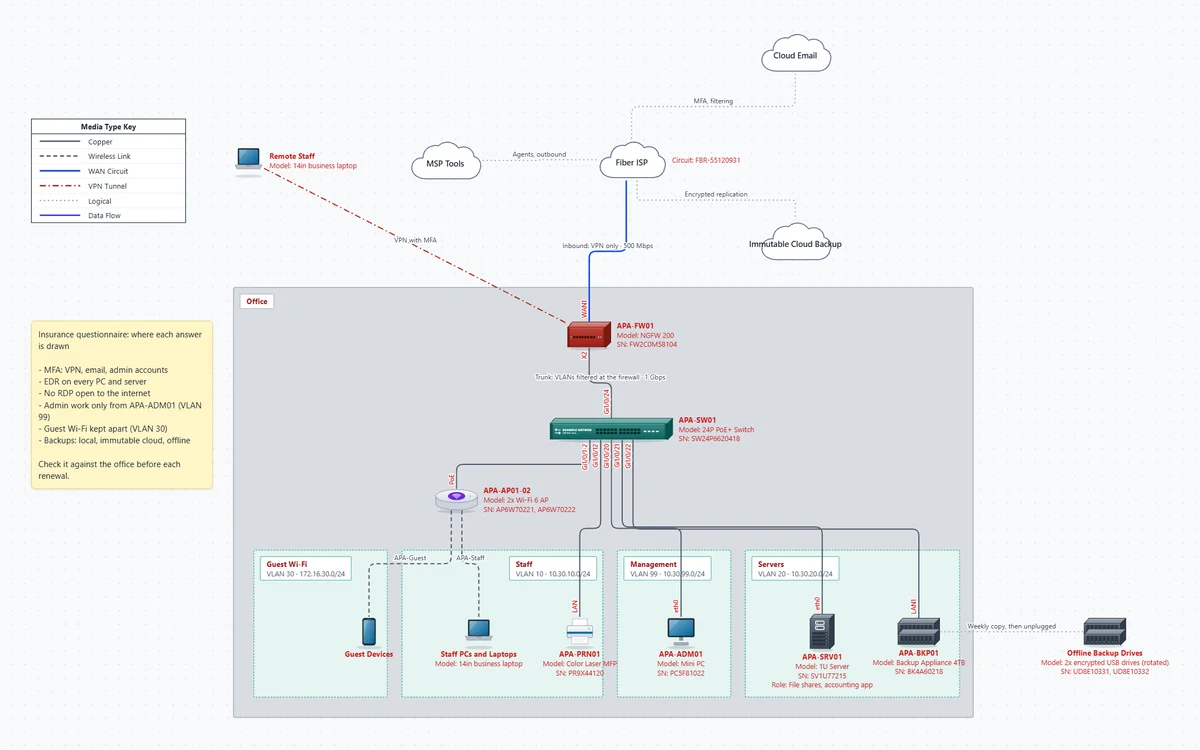
A 25-person office, looked after by an MSP, drawn so each security question on a cyber insurance application has a place on the diagram: MFA on remote access, email and admin accounts, EDR, no RDP open to the internet, a management VLAN, and backups in three places, one of them offline. A second page traces the backups. It helps you answer the questionnaire accurately; it doesn't decide your coverage.

On your phone? The editor is made for a computer. Email yourself a link and open the template at your desk. Email me a link for my computer
Opens the real editor in your browser. No account needed to look around; the free 14-day trial (no credit card) adds saving and PDF export.
Cyber insurance network diagram template: a small office firewall with VPN and MFA, staff, server, guest and management VLANs, a backup appliance replicating to an immutable cloud backup, and offline backup drives drawn disconnected

What's in this template

Two pages: the office network and the backups. The devices on both pages share hostnames and IPs.

A closed perimeter

The firewall's internet link is labeled "Inbound: VPN only", and its note says no RDP, SMB or admin interface is open to the internet. Remote staff come in over the VPN with MFA.

Segmented VLANs

Staff VLAN 10, Servers VLAN 20, Guest Wi-Fi VLAN 30 (client isolation) and Management VLAN 99, all routed through the firewall so it filters traffic between them.

Admin, endpoints and email

A privileged access workstation in VLAN 99 for admin work with separate admin accounts and MFA. EDR noted on every PC, laptop and server. Cloud email with MFA and filtering, and the MSP's tools with outbound-only agents.

Backups in three places

The server backs up to a local appliance, which replicates to an immutable cloud backup. A weekly copy goes to encrypted drives drawn outside the office on a dotted line: "Weekly copy, then unplugged".

Page 2, Backups (3-2-1): the office, the backup vendor's cloud, the email provider and an offsite safe are trust boundaries, and the backups move along numbered data flow lines: 1. nightly image backup from the server to the local appliance; 2. replication to the immutable cloud backup (locked for 30 days, kept for 90); 3. a weekly copy to offline drives that are unplugged afterwards. Mailboxes are backed up to the same immutable store. Each copy records what it holds, how long it's kept and whether it's encrypted, and the PDF lists them. A sticky note on page 1 lists the questionnaire answers the diagram backs up.

What underwriters ask, and where it's drawn

Applications and renewal questionnaires differ between insurers and change from year to year, but many ask a similar core set of questions about security controls. Each row below is one of those questions and the place on the diagram that answers it. The diagram doesn't replace your answers; it lets you, your MSP and your broker check them against the same picture.

Common questionWhat it's getting atWhere it is in the template
MFA on remote accessA stolen password alone can't get anyone into the networkRemote Staff to the firewall: "VPN with MFA"; the firewall's note
MFA on emailMailbox takeover and invoice fraudCloud Email: MFA on every mailbox, legacy sign-in blocked, filtering on
MFA and separate accounts for adminsHow admin credentials are protectedAPA-ADM01 in Management VLAN 99 with separate admin accounts and MFA; the backup admin is separate from the domain
EDR on endpoints and serversDetection and response beyond basic antivirusEDR noted on staff devices, remote laptops, the server and the admin workstation; MSP Tools holds the EDR console
Offline or immutable backups, testedWhether you can recover from ransomware without payingPage 2: local appliance, immutable cloud copy and offline drives as separate copies; quarterly restore test noted on APA-BKP01
RDP or other remote access open to the internetExposed remote desktop is a well-known ransomware entry pointThe internet link labeled "Inbound: VPN only" and the firewall's note
Network segmentationHow far an attacker could move from one infected PCStaff, Servers, Guest and Management VLANs, filtered at the firewall
PatchingHow quickly known holes get closedOS and firmware versions on each device; notes say who patches and how often
End-of-life systemsSystems that no longer get security fixesOS version for every device in the PDF inventory, so an unsupported one stands out
Vendor and MSP accessHow outsiders with admin rights get inMSP Tools: technicians sign in with MFA, agents connect outbound only

These are common questions, not any insurer's form. Your insurer's application, your broker and the policy wording decide what's asked and what qualifies. Some insurers also scan your public IP addresses during underwriting, so the diagram and the firewall should tell the same story. Draw what you actually run, not what the template shows. More on keeping network documentation ready for reviews: network documentation for audits.

Do insurers require a network diagram? Few applications ask you to attach one. It earns its place anyway. The questionnaire asks you to confirm that MFA, EDR and backups are in place, and those answers are much easier to get right when you can point at the VPN, every device and every backup copy. Applications usually ask you to confirm your answers are accurate, and a misstatement can give an insurer grounds to deny a claim or void the policy, depending on the wording and the law that applies. A dated diagram with a change log is also a record of what was in place when you applied, which helps if a claim is ever investigated.

For MSPs: one diagram per client, reviewed before each renewal, turns the questionnaire into a walk-through instead of a guess. The template is set up the way MSP client sites usually are: one closet, one firewall, a handful of VLANs and your own tools drawn as outside services.
How to adapt it to your office

Work from the firewall, your backup console and last year's application.

  1. 1

    Open the template

    Click Open this template. No account needed; nothing you type leaves your computer.

  2. 2

    Redraw the office

    Swap in your firewall, switches and access points, set each VLAN's subnet, and delete what you don't have.

  3. 3

    Record the controls

    In each device's notes, write what's really in place: MFA, EDR, who patches it and how often. Leave out anything that isn't true yet.

  4. 4

    Draw the backups as they are

    On page 2, draw every copy that exists today. If there's no offline or immutable copy, don't draw one; that's the gap to close before you sign.

  5. 5

    Fill in the inventory

    Model, serial and OS version for every device. The PDF inventory makes an end-of-life system easy to spot.

  6. 6

    Answer from the diagram

    Click Check, Mark verified today, export the PDF and keep it with the application. Do it again at each renewal.

Related templates

Every template opens in the same editor, so you can copy devices and areas from one into another.

Questions

Do cyber insurers require a network diagram?

Few applications ask you to attach one, and requirements vary by insurer. A diagram helps you answer the security questions accurately and gives you a dated record of what was in place when you applied.

What if an answer on our application turns out to be wrong?

Applications usually ask you to confirm your answers are accurate. A misstatement, such as saying MFA is on everywhere when it isn't, can give the insurer grounds to deny a claim or void the policy, depending on the policy wording and the law that applies. Check each answer against the real network, and talk to your broker about anything that's only partly true.

Will this template get us approved for coverage?

No. Insurers decide what qualifies, and their requirements differ and change between renewals. The template shows where the controls insurers commonly ask about would be drawn; your diagram has to show what you actually run.

What counts as an offline or immutable backup?

Offline means a copy that can't be reached from the network, like an encrypted drive that's unplugged and stored offsite. Immutable means a copy that can't be changed or deleted for a set period, even with admin credentials. Ask your insurer how it defines each, and be ready to say when you last tested a restore.

Where does our network diagram end up?

Only on your computer. The editor runs in your browser and diagrams are saved as files you keep; our servers never receive them, so a map of your network isn't sitting with one more vendor. Security details.

Is the template free to use?

Opening and editing it in your browser is free, with no account. Saving the file and exporting the PDF need the free 14-day trial (just your email, no credit card). After that, editing it needs Pro: it has 16 devices on two pages, more than the Free plan's 10 devices on one page. The office page alone has 11, so a one-page version with one device fewer fits Free. Pro is $9 a month billed yearly, or $15 month to month, and CallSketch is included.

Open the cyber insurance template in your browser.

No signup to look around. Redraw it around your office before renewal, and start the trial when you want the PDF.

Open this template