Updated
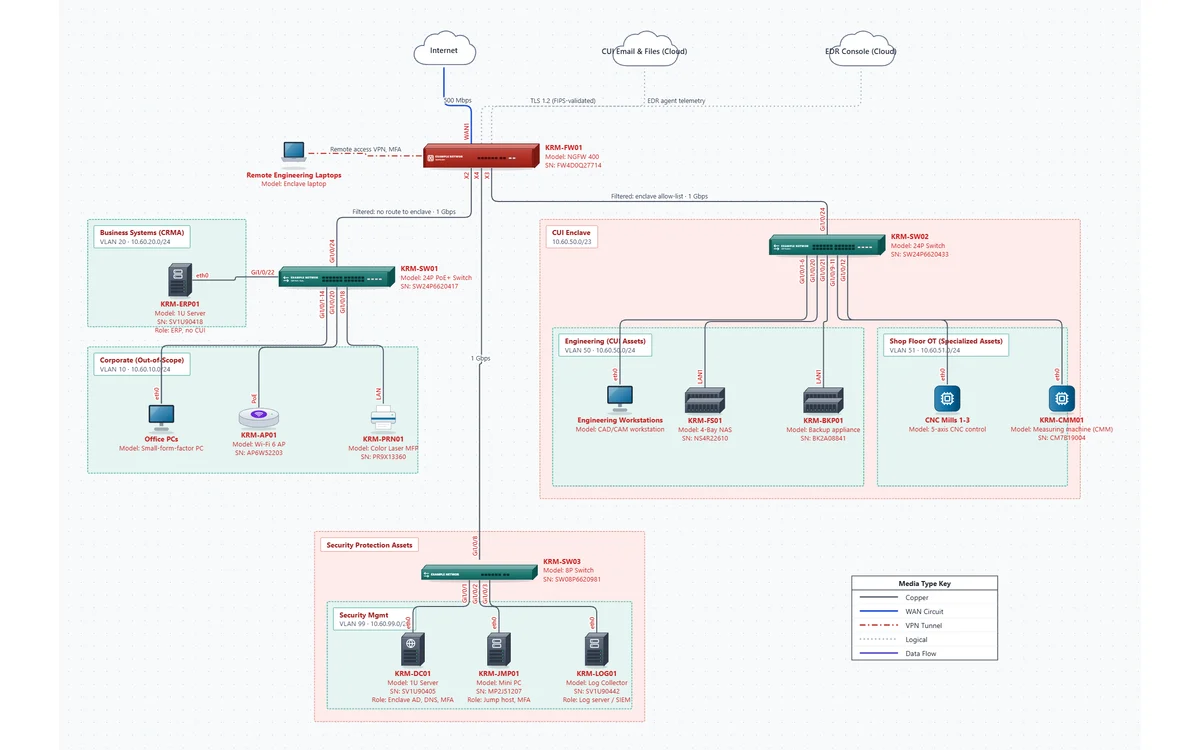
A small machine shop that keeps controlled unclassified information (CUI) in an enclave, so the rest of the company stays out of the CMMC Assessment Scope. Every area is named for its Level 2 asset category, and a second page traces CUI from the prime contractor to the shop floor and back. It's a starting point for your own SSP diagram, not an assessment.
Two pages: the network and the CUI data flow. The devices on both pages share hostnames and IPs.
10.60.50.0/23 behind its own firewall interface. VLAN 50 holds the CUI Assets: six CAD/CAM workstations, the encrypted file server and the backup appliance. Remote engineers come in over an always-on VPN with MFA.
CNC mills and a coordinate measuring machine on VLAN 51, inside the enclave but in their own category: they handle CUI (programs and inspection data) but run vendor-locked software, so the SSP describes how they're managed.
The firewall, plus VLAN 99 with the enclave domain controller and MFA, a jump host (the only admin path into the enclave) and a log server. The cloud EDR console is drawn too, because it handles security data.
The ERP server sits in Business Systems VLAN 20 as a Contractor Risk Managed Asset: it could hold CUI, but policy keeps it to part numbers. Office PCs and Wi-Fi on VLAN 10 are Out-of-Scope Assets with no route to the enclave.
Page 2, CUI Data Flow: the enclave, the Security Protection Assets, the prime contractor, the FedRAMP Moderate cloud and the corporate side are trust boundaries, and CUI moves along numbered data flow lines: 1. the prime posts drawings and specs to its supplier portal; 2. engineering downloads them over TLS and later returns inspection reports; 3. they're stored and edited on the file server; 4. CNC programs go to the shop floor; 5. the CMM writes inspection results back; 6. the file server is backed up nightly, encrypted. CUI email arrives through the cloud tenant, only part numbers cross to the ERP server, and admin sessions come only from the jump host. Each line records the data it carries, its classification, protocol, encryption and purpose, and the PDF lists them in a Data Flows table.
A CMMC assessment starts with scope, and scope starts with the diagram. The assessor reads it to find the edge of the enclave, then asks about every connection that crosses it and every system that touches it. Most of the hard questions are about the assets in between: the firewall and log server that protect the enclave, the ERP server that could hold CUI but shouldn't, the CNC machines you can't patch. So the template names each area after its asset category from the scoping rule, and puts the out-of-scope network on the page too, where the assessor can see it's cut off.
| Requirement | What it asks for | Where it is in the template |
|---|---|---|
| 32 CFR 170.19(c) | CUI Assets, Security Protection Assets, Contractor Risk Managed Assets and Specialized Assets documented in the asset inventory, the SSP and the network diagram of the CMMC Assessment Scope; Out-of-Scope Assets justified | Network page: each area is named for its category, and the corporate VLAN is marked out of scope with no route to the enclave |
| 3.12.4 | System security plans that describe system boundaries, environments of operation, how requirements are implemented, and connections to other systems | The enclave zone and its notes, every link crossing its edge, and the PDF to attach to the SSP |
| 3.13.1 | Monitor, control and protect communications at external boundaries and key internal boundaries | Firewall links labeled "Filtered: enclave allow-list" and "Filtered: no route to enclave"; the zone note says what's denied |
| 3.13.5 | Subnetworks for publicly accessible system components, physically or logically separated from internal networks | The shop hosts nothing public, so there's no DMZ. If you run a public web or file transfer server, draw it in its own VLAN outside the enclave |
| 3.1.3 | Control the flow of CUI in accordance with approved authorizations | CUI Data Flow page: every path CUI takes, and the one non-CUI flow (part numbers) allowed out to the ERP server |
| 3.4.1 | Baseline configurations and inventories of systems, including hardware, software, firmware and documentation | The PDF's device inventory: hostname, vendor, model, serial, management IP, OS / firmware, location and asset tag |
| 3.13.8, 3.13.11 | Cryptography to protect CUI in transit (unless physically protected), and FIPS-validated cryptography where it protects CUI | Each data flow line records its protocol and encryption; the cloud link is labeled FIPS-validated |
| 3.1.12, 3.1.13, 3.5.3 | Monitor and control remote access, protect remote sessions with cryptography, and use MFA | Remote laptops on a VPN tunnel with MFA; the jump host as the only admin path |
| 3.8.9 | Protect the confidentiality of backup CUI at storage locations | KRM-BKP01: encrypted at rest, retention recorded, offsite copy noted |
Requirement numbers are from NIST SP 800-171 Rev 2, the version CMMC Level 2 assesses. The asset categories are from the CMMC program rule, 32 CFR 170.19(c), and the DoD CIO's Level 2 Scoping Guide. Your assessor decides what satisfies them; treat this as a checklist, not a guarantee. CMMC's rollout dates have changed before: DoD suspended Phase 2 in July 2026 pending a program review, so check the DoD CIO CMMC pages for the current status. More on what auditors ask for: network documentation for audits, and on drawing data flows: data flow diagrams.
Cloud services count too. Under 170.19(c)(2), a cloud provider that stores, processes or transmits your CUI has to meet the FedRAMP requirements in DFARS 252.204-7012 (FedRAMP Moderate or equivalent), and a provider that only handles security data, like the EDR console, is assessed as a Security Protection Asset. The template draws both on the network page and keeps the cloud tenant as its own trust boundary on the data flow page, where its customer responsibility matrix belongs.
Work from your SSP, your firewall rules and the CUI your primes actually send you.
Click Open this template. No account needed; nothing you type leaves your computer.
List every system and put it in one category: CUI, Security Protection, Contractor Risk Managed, Specialized or Out-of-Scope. Move devices into the matching area, and delete areas you don't have.
Click each link that crosses the enclave edge and label it with what it allows. Set the firewall interface at each end, and use the zone's notes for what's denied.
On the CUI Data Flow page, draw a Data Flow line for each way CUI arrives, moves and leaves, in order, with the protocol and encryption on each. Include email, backups, admin access and anything that sends data out of the enclave.
Hostname, model, serial, OS / firmware and location for every in-scope device; the PDF inventory prints them for your asset list.
Click Check, walk the diagram against the shop, Mark verified today, and export the PDF for your SSP.
Every template opens in the same editor, so you can copy devices and areas from one into another.
No tool does that. Your assessor (a C3PAO, or you in a self-assessment) decides whether each requirement is met, from your SSP, your evidence and the systems themselves. The template gives you a clear way to show the assessment scope and how CUI moves, and NetworkSketch keeps the inventory, change log and verified date with the diagram.
Under 32 CFR 170.19(c), CUI Assets, Security Protection Assets, Contractor Risk Managed Assets and Specialized Assets each go in the asset inventory, the SSP and the network diagram of the CMMC Assessment Scope. Out-of-Scope Assets don't have to be assessed, but you have to be ready to justify why they can't process, store or transmit CUI, so the template still draws the corporate network outside the enclave to show where the boundary is.
It depends on the contract and on timing we can't promise. Phase 1 of the CMMC rollout began on November 10, 2025, mainly with self-assessments. In July 2026 DoD suspended the start of Phase 2, which would have started requiring C3PAO certification on Level 2 contracts that call for it, pending a program review; later phases are on hold too. Check the DoD CIO CMMC pages for the current status. Either way, DFARS 252.204-7012, if it's in your contract, already requires you to implement NIST SP 800-171 for systems that handle covered defense information (CUI), and the SSP and its boundary are part of that.
Rev 2. The CMMC program rule (32 CFR Part 170) incorporates NIST SP 800-171 Rev 2, and DoD has kept Rev 2 for DFARS 252.204-7012 as well, even though NIST published Rev 3 in May 2024. The requirement numbers on this page are Rev 2 numbers. Check DoD guidance in case that changes.
Only on your computer. The editor runs in your browser and diagrams are saved as files you keep; our servers never receive them, so you aren't handing your enclave layout to another provider. Security details.
Opening and editing it in your browser is free, with no account. Saving the file and exporting the PDF need the free 14-day trial (just your email, no credit card). After that, editing it needs Pro: its network page alone has 17 devices, more than the Free plan's 10 devices on one page. Pro is $9 a month billed yearly, or $15 month to month, and CallSketch is included.
No signup to look around. Redraw the enclave around your CUI, and start the trial when you want the PDF.
Open this template