HIPAA network diagram template

HIPAA network diagram template: the clinic network and where ePHI goes

Updated

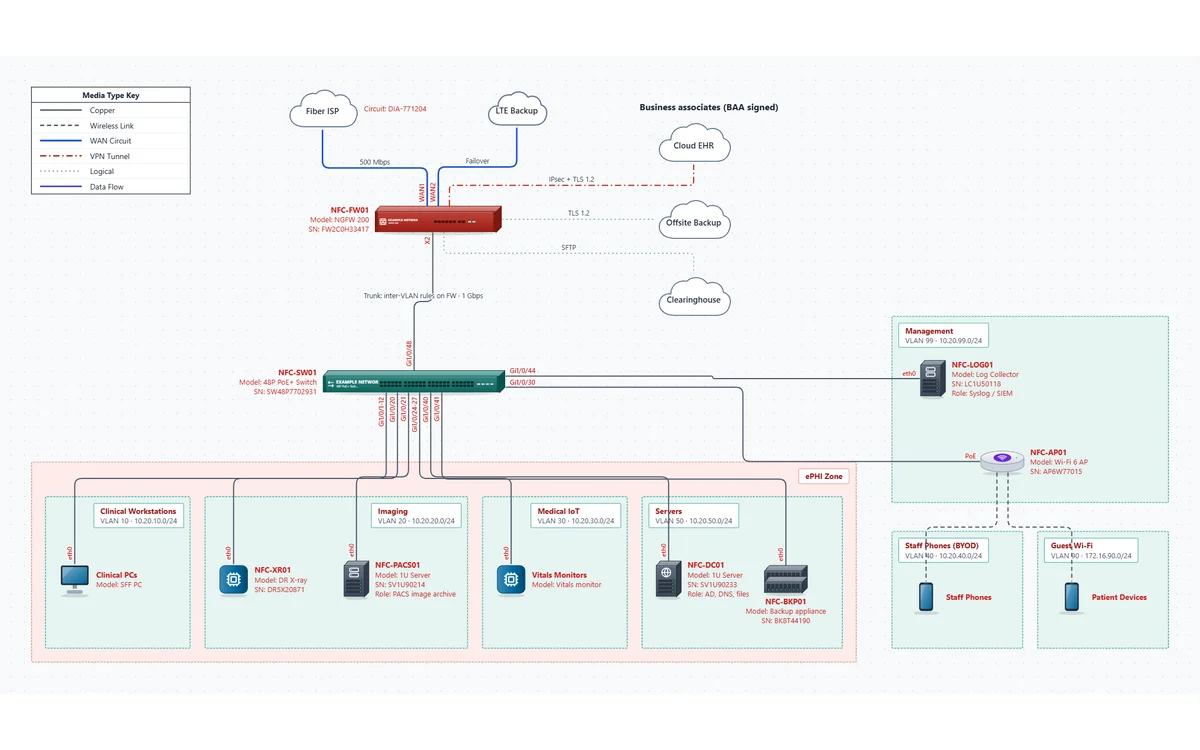
A small medical clinic with every system that touches ePHI drawn inside its own zone, imaging and medical IoT on their own VLANs, and staff phones and guest Wi-Fi kept outside. A second page follows ePHI from the exam room to the EHR, the clearinghouse, pharmacies, referrals and backups, with each business associate marked. It's a starting point for your own network, not a risk analysis.

On your phone? The editor is made for a computer. Email yourself a link and open the template at your desk. Email me a link for my computer
Opens the real editor in your browser. No account needed to look around; the free 14-day trial (no credit card) adds saving and PDF export.
HIPAA clinic network template: a firewall with fiber and LTE uplinks, links to the cloud EHR, offsite backup and clearinghouse, and an ePHI zone holding clinical workstation, imaging, medical IoT and server VLANs, with management, staff phone and guest Wi-Fi VLANs outside it

What's in this template

Two pages: the clinic network and the ePHI data flow. The devices on both pages share hostnames and IPs.

The ePHI zone

Clinical Workstations VLAN 10 (12 exam room and front desk PCs, 802.1X on the ports), Imaging VLAN 20 (a DR X-ray and the PACS server), Medical IoT VLAN 30 (vitals monitors, allow-listed MACs) and Servers VLAN 50 (domain controller and backup appliance).

External connections

Fiber with LTE failover into one firewall, and a labeled line to each business associate: the cloud EHR over IPsec and TLS 1.2, offsite backup over TLS, the clearinghouse over SFTP.

Management and logging

VLAN 99 with a syslog / SIEM collector that keeps firewall, switch, AP, server and EHR sign-in logs for a year, and the access point's management address.

Kept out of the zone

Staff phones (BYOD, VLAN 40, internet only) and patient guest Wi-Fi (VLAN 90, client isolation) hang off the same access point but have no route into the ePHI zone.

Page 2, ePHI Data Flow: the clinic, the cloud EHR vendor, the offsite backup vendor, the clearinghouse and the email / e-fax service are trust boundaries, each business associate noted BAA signed. Numbered data flow lines follow ePHI: 1. patients to the portal; 2. charting from clinical PCs to the EHR; 3. DICOM images from the X-ray to the PACS; 4-5. claims through the clearinghouse to health plans and remittances back; 6. e-prescriptions to pharmacies; 7. referrals by secure email or fax; 8-9. nightly backup to the local appliance and an encrypted, immutable offsite copy. Every line is tagged Health data and records its protocol, encryption and purpose, and every store records encryption at rest and retention. The PDF lists them in a Data Flows table.

What the HIPAA Security Rule asks the diagram to show

A HIPAA risk analysis starts with one question: where does ePHI live, and how does it move? If a system isn't on the diagram, it usually isn't in the risk analysis either, and the gaps that show up after an incident are rarely the EHR. They're the X-ray workstation nobody patched, the backup drive in the closet, the scanner that emails PDFs, the vendor with remote access. The template draws those things on purpose.

SectionWhat it asks forWhere it is in the template
164.308(a)(1)(ii)(A)Risk analysis: an accurate and thorough assessment of risks to the confidentiality, integrity and availability of ePHIBoth pages together: every system that creates, receives, keeps or sends ePHI, and every path it takes
164.308(a)(1)(ii)(D)Information system activity reviewNFC-LOG01 on the Management VLAN, and its note listing which logs it keeps and for how long
164.308(a)(7)(ii)(A), (B)Data backup plan and disaster recovery planFlows 8 and 9: nightly local backup, then an encrypted, immutable offsite copy; retention on both stores
164.308(b)(1), 164.314(a)Business associate contractsPage 2: each business associate is its own trust boundary noted BAA signed; page 1: a labeled line to each one
164.310(d)(1), (d)(2)(iii)Device and media controls; accountability for hardware and media (addressable)The PDF's device inventory: hostname, model, serial, management IP, area and location, including the backup appliance
164.312(a)(1), (a)(2)(iv)Access control; encryption and decryption of ePHI (addressable)The ePHI zone and its note on what may reach it; encryption at rest recorded on each data store
164.312(b)Audit controlsThe log collector and the devices that send to it
164.312(e)(1), (e)(2)(ii)Transmission security; encryption in transit (addressable)Every ePHI flow records its protocol and encryption; Check flags any Health data flow marked unencrypted

Section numbers are from the HIPAA Security Rule, 45 CFR Part 164, Subpart C, as in force when this page was written. Your auditor, assessor or OCR decides what satisfies them; treat this as a checklist, not a guarantee. More on what auditors ask for: network documentation for audits, and on drawing data flows for any security review: data flow diagrams.

Addressable doesn't mean optional

Encryption at rest and in transit are addressable under the current rule. That means you implement them where reasonable and appropriate, or you write down why not and what you do instead. The template shows the honest version: DICOM over TLS where the modality supports it. Many older modalities only speak plain DICOM; if yours does, record the flow's encryption as None, let Check flag it, and put the reason and the compensating control (the isolated Imaging VLAN, firewall rules) in the line's notes. That's the documentation an auditor asks for.

The proposed network map requirement

In January 2025 HHS published a proposed update to the Security Rule (an NPRM). As proposed, it would require a written technology asset inventory and a network map showing how ePHI moves through your systems, reviewed at least every 12 months and when the environment changes. It would also remove the addressable / required distinction and make encryption required with limited exceptions. These were proposals when this page was written, not final rules; check HHS's Security Rule page for the current status. Either way, the current risk analysis requirement already means you need to know where ePHI lives, and the template's two pages, device inventory, change log and verified date are built for a yearly review.
How to adapt it to your clinic

Work from your firewall rules, your switch's VLAN list and your list of business associate agreements.

  1. 1

    Open the template

    Click Open this template. No account needed; nothing you type leaves your computer. Don't put patient data in the diagram; it doesn't need any.

  2. 2

    Draw what's really there

    Rename the VLANs and devices to match your switch and firewall. Add the things that get forgotten: imaging workstations, label printers, fax machines and scanners, the backup drive, vendor remote access tools.

  3. 3

    Redraw the ePHI zone

    Resize it around every system that creates, receives, keeps or sends ePHI, and use its notes to say what may reach it. Put guest and BYOD networks outside it.

  4. 4

    Mark your business associates

    One trust boundary per vendor with a BAA: EHR, backup, billing, email or fax, IT support. If you can't find the BAA for a vendor that holds ePHI, that's a finding before the diagram is done.

  5. 5

    Trace the ePHI

    On the ePHI Data Flow page, draw Data Flow lines tagged Health data, with the encryption on each and the encryption at rest and retention on each store. Check flags ePHI sent unencrypted, stores with no encryption or retention recorded, and flows that cross a boundary without a purpose.

  6. 6

    Review and stamp it

    Fill in model, serial, OS and location for the inventory, walk the clinic against the diagram, Mark verified today, and export the PDF for your risk analysis file.

Related templates

Every template opens in the same editor, so you can copy devices and areas from one into another.

Questions

Does HIPAA require a network diagram?

The current Security Rule doesn't name one. It does require an accurate and thorough risk analysis (45 CFR 164.308(a)(1)(ii)(A)), and you can't do that without knowing where ePHI is created, received, kept and sent. A network diagram and an ePHI data flow are the usual way to show it, and auditors and OCR investigators commonly ask for them. HHS's January 2025 proposed rule would add an explicit requirement for a written technology asset inventory and network map, reviewed at least every 12 months. It was a proposal when this page was written; check HHS for its current status.

Does this template make us HIPAA compliant?

No tool or template does. Compliance depends on your safeguards, policies and risk analysis, and on whoever audits or investigates you. The template gives you a clear way to show where ePHI lives and moves, and NetworkSketch keeps the device inventory, change log and verified date with the diagram.

Is encryption required by HIPAA?

Under the current Security Rule, encryption at rest (164.312(a)(2)(iv)) and in transit (164.312(e)(2)(ii)) are addressable, not optional: you implement them if reasonable and appropriate, or document why not and what you do instead. Encrypting to HHS guidance also matters after a lost laptop or a breach, because properly encrypted data isn't unsecured PHI for breach notification. The 2025 proposed rule would make encryption required with limited exceptions; check its current status. The template records the encryption on every ePHI flow and store.

Who counts as a business associate on the diagram?

Vendors that create, receive, keep or send ePHI for you: the cloud EHR, offsite backup, the billing clearinghouse, secure email or e-fax, and usually your MSP. HHS guidance says a cloud provider that stores ePHI is a business associate even if it can't read the encrypted data. Pharmacies and referring providers receiving records for treatment are other covered entities, so the template draws them outside any business associate boundary.

Where does our network diagram end up?

Only on your computer. The editor runs in your browser and diagrams are saved as files you keep; our servers never receive them, so drawing your network doesn't add another vendor to your list. The template itself holds no patient data, and neither should your diagram. Security details.

Is the template free to use?

Opening and editing it in your browser is free, with no account. Saving the file and exporting the PDF need the free 14-day trial (just your email, no credit card). After that, editing it needs Pro: the network page alone has 12 devices and there are two pages, more than the Free plan's 10 devices on one page. Pro is $9 a month billed yearly, or $15 month to month, and CallSketch is included.

Open the HIPAA template in your browser.

No signup to look around. Redraw the ePHI zone around your clinic's systems, and start the trial when you want the PDF.

Open this template