ISO/IEC 27001:2022 network diagram template

ISO 27001 network diagram template: the ISMS scope, its edges and network segregation

Updated

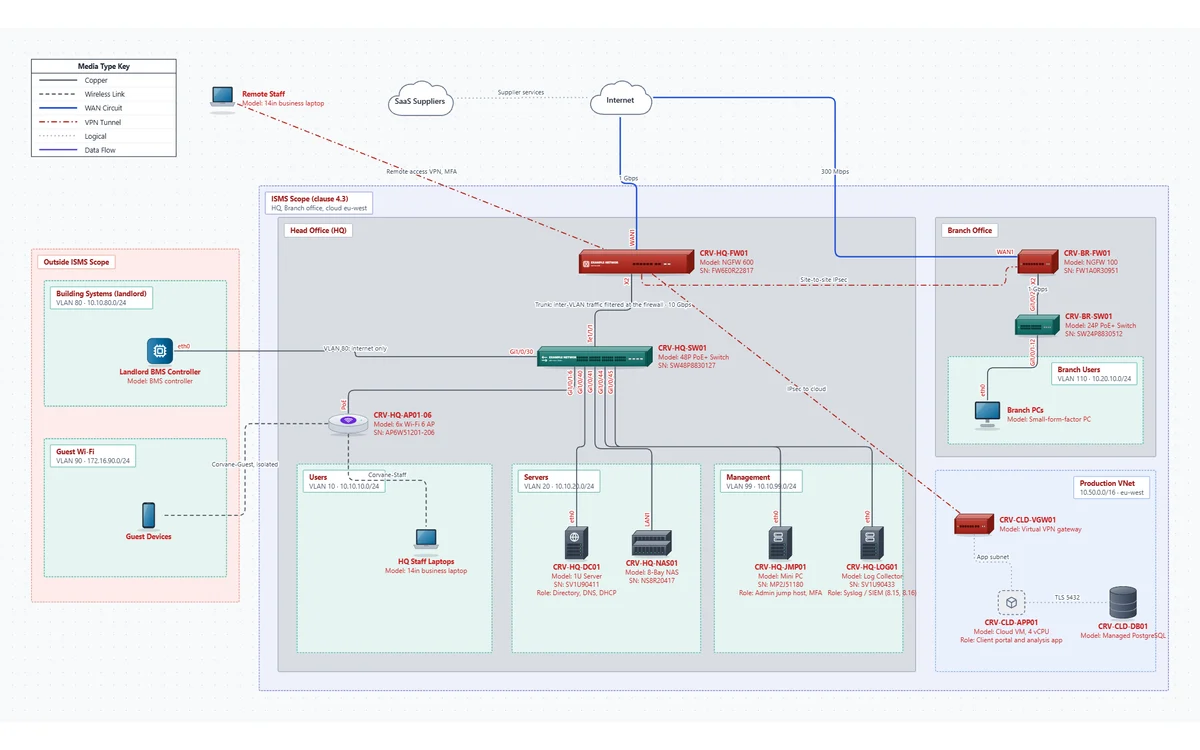
A mid-size company with a head office, a small branch and a cloud network, drawn inside one ISMS scope boundary. The networks left out of the scope, guest Wi-Fi and the landlord's building systems, are drawn too, where they plug in. A second page traces one key process: client data in, analysis, report out. It's a starting point for your own scope, not a certification.

On your phone? The editor is made for a computer. Email yourself a link and open the template at your desk. Email me a link for my computer
Opens the real editor in your browser. No account needed to look around; the free 14-day trial (no credit card) adds saving and PDF export.
ISO 27001 network diagram template: an ISMS scope boundary around a head office with users, servers and management VLANs, a branch office and a cloud VNet, with guest Wi-Fi and landlord building systems drawn outside the scope

What's in this template

Two pages: the ISMS scope and a client data flow. The devices on both pages share hostnames and IPs.

The scope boundary

An ISMS Scope (clause 4.3) trust boundary around the head office, the branch and the production cloud network. Its note lists what's in and what's excluded, the way your scope statement does.

Segregated networks

Users VLAN 10 (802.1X), Servers VLAN 20, and Management VLAN 99 with an admin jump host (MFA) and the log collector. The firewall is every VLAN's gateway, so traffic between them passes its rules.

What's left out, drawn anyway

The landlord's building systems (VLAN 80, internet only) and Guest Wi-Fi (VLAN 90, client isolation) sit in an Outside ISMS Scope zone, with the links into it labeled.

Branch, cloud and remote staff

A branch firewall with site-to-site IPsec to HQ, an IPsec tunnel to the cloud VNet (VPN gateway, app server, managed database), and remote staff on VPN with MFA. SaaS suppliers sit outside the boundary.

Page 2, Client Data Flow: the ISMS scope and the file sharing supplier are trust boundaries, and client data moves along numbered data flow lines: 1. the client uploads a dataset (TLS 1.3); 2. the app stores and queries it in a database encrypted with customer-managed keys; 3. analysts work on it over the VPN; 4. the final report goes to the supplier's file share; 5. the client downloads it. A nightly backup goes to a vault in a second region and audit logs go to the log collector. Each line records the data, its classification, protocol, encryption and purpose, and the PDF lists them in a Data Flows table.

What ISO 27001 auditors look for in the diagram

ISO/IEC 27001 doesn't list a network diagram as a required document. What it does require is a documented ISMS scope that takes account of interfaces and dependencies with what others run (clause 4.3), plus evidence for the Annex A controls in your Statement of Applicability. A network diagram is the quickest way to show both, so auditors commonly ask for one early and use it to decide what to sample. They read it for the edges: where the scope stops, what crosses that line, and how the networks inside are kept apart.

Clause / controlWhat it's about (our summary)Where it is in the template
4.3Deciding the boundaries of the ISMS, including interfaces and dependencies with activities others performThe ISMS Scope boundary and its note, the Outside ISMS Scope zone, and every link that crosses the boundary
5.9An inventory of information and other associated assets, with ownersThe PDF's device inventory (hostname, model, serial, IP, location, asset tag) and the data stores on page 2 with their owners
5.14Rules and protection for transferring information, inside the organization and with other partiesClient Data Flow page: numbered flows with protocol, encryption and purpose, including the handover through the supplier
5.23Information security for the cloud services you useThe production VNet inside the scope; SaaS suppliers outside it, with a note pointing to supplier controls
6.7, 8.1Remote working and user endpoint devicesRemote Staff on VPN with MFA; laptops noted with disk encryption and EDR
8.13Information backupThe HQ NAS as a backup target, and a Backup Vault in a second cloud region with its retention
8.15, 8.16Logging, and monitoring networks and systems for unusual behaviourThe log collector in the management VLAN and the audit log flow on page 2
8.20Securing and controlling networks and network devicesA firewall at each site, the filtered trunk, and admin access only through the jump host
8.21Security features and service levels of network services, in-house or outsourcedISP links, VPN tunnels and supplier services drawn and labeled; their notes hold the service details
8.22Splitting services, users and systems into separate networksUsers, Servers and Management VLANs routed through the firewall; guest and building systems outside the scope, internet only

Clause and control numbers are from ISO/IEC 27001:2022 and its Annex A. The descriptions are our own summary, not the standard's wording; get the standard from ISO or your national standards body for the exact text. Your certification body's auditor decides what satisfies a control; treat this as a checklist, not a guarantee. If your old diagrams cite controls like A.13.1.3, those are 2013 numbers: the transition period to the 2022 edition ended on 31 October 2025. More on what auditors ask for: network documentation for audits, and on drawing data flows for any security review: data flow diagrams.

Excluding a network from the scope doesn't take it off the diagram. The guest Wi-Fi and the landlord's building controller still plug into an in-scope switch, so the template draws them outside the boundary with their links labeled ("VLAN 80: internet only"). That's the conversation an auditor wants to have about an exclusion: why it's out, and what stops it reaching what's in.
How to adapt it to your ISMS

Work from your scope statement, your firewall rules and your asset register.

  1. 1

    Open the template

    Click Open this template. No account needed; nothing you type leaves your computer.

  2. 2

    Draw your scope

    Resize the ISMS Scope boundary around the sites, networks and cloud accounts your scope statement covers, and paste its in and out list into the boundary's notes.

  3. 3

    Place the exclusions

    Move guest, tenant, landlord and other excluded networks into the Outside ISMS Scope zone. Label each link into it with what it can reach.

  4. 4

    Fill in the inventory

    Set each VLAN's subnet and gateway, then hostname, model, serial, location and asset tag for every device. The PDF inventory can back up your asset register (5.9).

  5. 5

    Trace a key process

    On page 2, draw Data Flow lines for the information that matters most, in the order it moves. Check flags sensitive data with no encryption recorded and data stores with no retention period.

  6. 6

    Review and stamp it

    Click Check, walk the diagram with whoever runs the network, Mark verified today, and export the PDF for the auditor. Repeat before each internal audit and management review.

Related templates

Every template opens in the same editor, so you can copy devices and areas from one into another.

Questions

Does ISO 27001 require a network diagram?

Not by name. It requires a documented ISMS scope that covers interfaces and dependencies (clause 4.3), and evidence for the Annex A controls in your Statement of Applicability, such as networks security (8.20) and segregation of networks (8.22). A network diagram is the usual way to show both, and auditors commonly ask to see one.

What should an ISMS scope diagram show?

The boundary of what's in scope; the sites, networks and cloud services inside it; what's excluded; and every connection that crosses the boundary: internet links, suppliers, remote users and excluded networks. Label each crossing with what it allows.

Does this template make us ISO 27001 certified?

No. Certification comes from a certification body's audit (ideally an accredited one) of your whole ISMS: the risk assessment, the Statement of Applicability, the controls and their records. The template gives you a clear picture of the scope and the network, and NetworkSketch keeps the inventory, change log and verified date with it.

Where does our network diagram end up?

Only on your computer. The editor runs in your browser and diagrams are saved as files you keep; our servers never receive them, so there's no new supplier to assess for it. Security details.

How often should the diagram be updated?

Whenever the scope or the network changes (a new site, a new cloud service, a new supplier connection), and before each internal audit (9.2) and management review (9.3). Add a change log line for each change and mark the diagram verified after each review.

Is the template free to use?

Opening and editing it in your browser is free, with no account. Saving the file and exporting the PDF need the free 14-day trial (just your email, no credit card). After that, editing it needs Pro: it has 24 devices on two pages, more than the Free plan's 10 devices on one page. Pro is $9 a month billed yearly, or $15 month to month, and CallSketch is included.

Open the ISO 27001 template in your browser.

No signup to look around. Redraw the boundary around your ISMS scope, and start the trial when you want the PDF.

Open this template