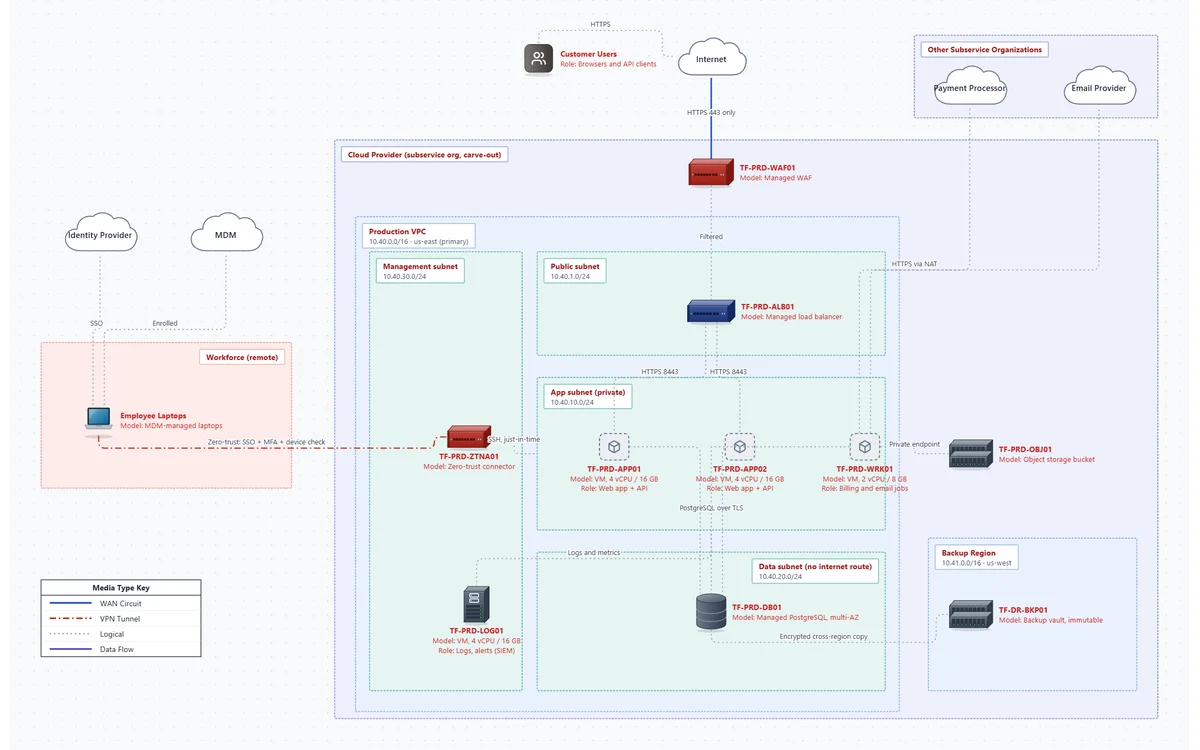
Does SOC 2 require a network diagram?
Not in so many words. None of the trust services criteria says "draw a diagram". What SOC 2 does require is a system description,
and the description criteria (DC 200) ask it to cover the components of the system used to provide the services: infrastructure,
software, people, procedures and data. It also has to say which subservice organizations the system depends on and how they're
treated. A diagram is the clearest way to show the first two of those components, and the auditor will test controls like boundary
protection against the network as it really is. So in practice the diagram turns up on the first request list, and many system
descriptions include one.
What the auditor reads it for is the boundary. Which systems are in scope, where traffic from the internet is filtered, how
administrators get in, where customer data is stored and backed up, and which parts belong to someone else. Anything on the
diagram is fair game for sampling; anything missing from it that turns up later (a forgotten admin path, a database replica in a
region nobody mentioned) is a finding waiting to happen.
Where each criterion shows up in the template
| Criterion | What it asks for | Where it is in the template |
|---|
| DC 3 (description criteria) | The components of the system: infrastructure, software, people, procedures and data | Production System page for infrastructure and software; Customer Data Flow page for data. People and procedures are written in the description itself |
| DC 7 | Subservice organizations, presented by the carve-out or inclusive method, with the controls you expect them to have (CSOCs) under carve-out | The cloud provider boundary and the Other Subservice Organizations boundary, both marked carve-out, with notes on what each covers |
| DC 6 | Controls you assume your customers perform (complementary user entity controls, CUECs) | The Customers boundary on page 2: its note says they manage their own users and API keys |
| CC6.1 | Logical access security over information assets; its points of focus include an inventory of information assets and network segmentation | The four subnets, the data subnet with no internet route, and the PDF's device inventory with model, IP, role and OS |
| CC6.6 | Logical access measures against threats from outside the system boundary | WAF and load balancer as the only way in; the zero-trust connector is outbound-only, with SSO, MFA and a device check |
| CC6.7 | Restrict and protect information during transmission, movement or removal | Every data flow line on page 2 records its protocol and encryption (TLS 1.2 or 1.3, SSH); card data never touches the app |
| CC6.4 | Physical access to facilities and protected assets | Carved out: the cloud provider's boundary note says data center physical security is its control |
| CC7.2 | Monitor system components for anomalies that could be malicious acts, natural disasters or errors | TF-PRD-LOG01, receiving logs and metrics from the app subnet, plus the audit log flow on page 2 |
| CC8.1 | Changes to infrastructure, data, software and procedures are authorized, tested, approved and documented | The diagram's change log and verified date; the WAF's note puts rule changes through change management |
| CC9.2 | Assess and manage risks from vendors and business partners | Subservice organizations and vendors (identity provider, MDM) drawn and named, with yearly report reviews in their notes |
| A1.2 (Availability) | Backup processes and recovery infrastructure | The backup region: an immutable vault in us-west receiving encrypted cross-region copies; A1.3 restore testing noted on it |
| C1.1 (Confidentiality) | Identify and maintain confidential information | Classifications on every data flow and data store, with retention on each store |
Criteria are from the AICPA's 2017 Trust Services Criteria (with revised points of focus, 2022) and the 2018 Description Criteria, DC 200 (with revised implementation guidance, 2022). Security (the common criteria) is in every SOC 2; Availability and Confidentiality only if you include them. In October and November 2026 the AICPA published exposure drafts of proposed 2027 trust services criteria and description criteria that would restructure some criteria; they're proposals, so check the AICPA site for their status and ask your CPA firm which version your examination uses. Your auditor decides what satisfies a criterion; treat this table as a checklist, not a guarantee. More on what auditors ask for: network documentation for audits, and on drawing data flows: data flow diagrams.
Carve-out or inclusive: how to draw subservice organizations
Your cloud provider runs the data centers, the hardware and the managed database underneath your system. Under the carve-out
method, which is what most startups use, its controls are left out of your report; your system description says what you expect
it to do (the complementary subservice organization controls) and how you check, usually by reading its SOC 2 report each year.
The template draws it as a trust boundary around the whole system, marked carve-out, so the reader sees at a glance what's yours
and what isn't. The VPC inside it, and everything you configure there, is yours and in scope.
Not every vendor is a subservice organization. A subservice organization performs controls your service commitments depend on.
Treat the template's choices (the payment processor and email provider as subservice organizations, the identity provider and MDM
as vendors) as an example; your auditor will help you draw the line for your system.
Type I and Type II
A Type I report looks at the design of your controls on one date; a Type II tests whether they operated over a period, often 3 to
12 months. For a Type II the diagram has to be right for the whole period, and significant changes during it belong in the system
description (DC 9). Add a change log line when the system changes (a new subnet, a new region, a new vendor) and mark the diagram
verified at each review, so you can show what it looked like when.